

5-Regular Member
October 6, 2020
Solved

CREO Parametric 6.0 Student edition installation
  • October 6, 2020
  • 1 reply
  • 5532 views

cgarrison-mogre_0-1601990568834.png

I am a college professor and have been teaching/using ProE/Creo for decades.  I've installed and assisted students in installing CREO especially in the past 8 months. We use the install_creo6_unistudent_standard.pdf document. 


Now I am trying to reinstall CREO 6.0 on my home PC again, follow these instructions, it seemed to work, the got a license failed.  I did get a JRE not up to date, but no indication that CREO Parametric license failed.

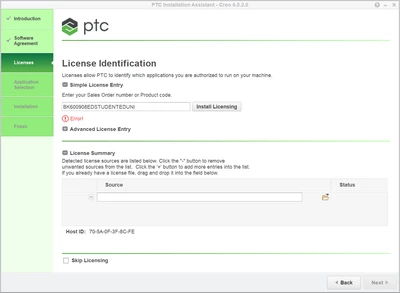
I've wiped everything I can find that might be PTC related and tried again and now get the message above.


I would like to to load CREO 7.0 eventually, since some of my students have it and I can't open their files.  However I can't find any CREO 7.0 student edition installation guide and I can't get past the Error!.
Best answer by MartinHanak

@cgarrison-mogre wrote:

cgarrison-mogre_0-1601990568834.png

I am a college professor and have been teaching/using ProE/Creo for decades.  I've installed and assisted students in installing CREO especially in the past 8 months. We use the install_creo6_unistudent_standard.pdf document. 


Now I am trying to reinstall CREO 6.0 on my home PC again, follow these instructions, it seemed to work, the got a license failed.  I did get a JRE not up to date, but no indication that CREO Parametric license failed.

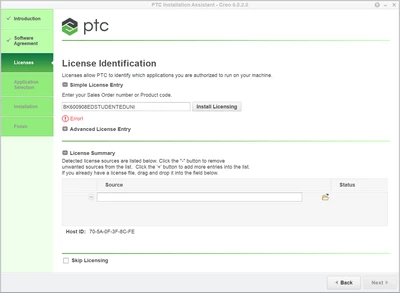
I've wiped everything I can find that might be PTC related and tried again and now get the message above.


I would like to to load CREO 7.0 eventually, since some of my students have it and I can't open their files.  However I can't find any CREO 7.0 student edition installation guide and I can't get past the Error!.


Hi,

1.]

Move the mouse to Error message ... I guess you will see " You have reached the maximum number of license requests available for your product type" text.

Resolution: You need different Product code ... maybe @Alex_Cazacu can send you new one.

2.]

In case of Creo 7.0 ... please read https://community.ptc.com/t5/PTC-Academic-Program-Discussions/product-code-or-sales-order-number/td-p/684922 discussion.

1 reply

24-Ruby III
October 7, 2020

@cgarrison-mogre wrote:

cgarrison-mogre_0-1601990568834.png

I am a college professor and have been teaching/using ProE/Creo for decades.  I've installed and assisted students in installing CREO especially in the past 8 months. We use the install_creo6_unistudent_standard.pdf document. 


Now I am trying to reinstall CREO 6.0 on my home PC again, follow these instructions, it seemed to work, the got a license failed.  I did get a JRE not up to date, but no indication that CREO Parametric license failed.

I've wiped everything I can find that might be PTC related and tried again and now get the message above.


I would like to to load CREO 7.0 eventually, since some of my students have it and I can't open their files.  However I can't find any CREO 7.0 student edition installation guide and I can't get past the Error!.


Hi,

1.]

Move the mouse to Error message ... I guess you will see " You have reached the maximum number of license requests available for your product type" text.

Resolution: You need different Product code ... maybe @Alex_Cazacu can send you new one.

2.]

In case of Creo 7.0 ... please read https://community.ptc.com/t5/PTC-Academic-Program-Discussions/product-code-or-sales-order-number/td-p/684922 discussion.

5-Regular Member
October 7, 2020

Thanks,  I have to do a lot of trouble shooting for students and faculty and had to run through the install procedure a few (too many) times to demonstrate remotely.

17-Peridot
October 7, 2020

Hello,


The student edition code works once on an account. 

For demonstrating and also for your students that have this issue, please use this guide:

http://apps.ptc.com/schools/references/install_creo6_schools_standard.pdf

The only differences between the license generated by the student code you are using and this one are:

1. This code will allow you to install multiple devices using the same academic user

2. The license created with this code will allow students to open commercial files (the student code allows them to use ONLY academic files).


Thanks,

Alex