
1-Visitor
October 7, 2011
Solved

CREO - Pro 5.0 Student Installation Error Message: Intenet Connection

  • October 7, 2011
  • 3 replies
  • 3573 views

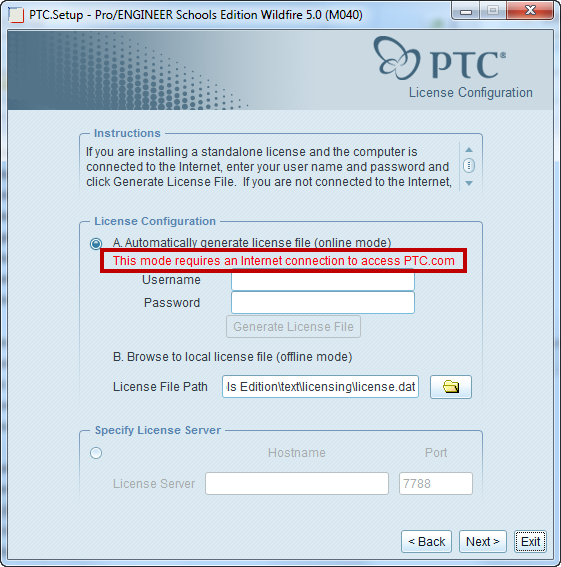
When I try to install the Creo Elements/Pro 5.0 Student Edition from the disk it gives me an error message that states: This mode requires an internet connection to access PTC.com.
    Best answer by

    This is not an error message, it is warning you that if you use method "A. Automatically generate license file (online mode)" you have to be connected to the internet. If your computer cannot be online (may school computers do not have access to the internet), you will have to use the offline method.

    9-15-2013 8-50-31 PM.png

    3 replies

    1-Visitor
    October 14, 2011

    I think I am having a similar problem. When it is time to locate the license file I only have the option of using the offline license, and not connecting to the server or a server license. Could this an issue with ports being blocked on my end? If so what is Pro|E looking for? When I install Wildfire 4 I can direct it to a port but there is no option in 5.

    1-Visitor
    September 12, 2013

    Same here.

    Woah 2 year necro.

    1-Visitor
    September 13, 2013

    You can Install in Run as Administrator of Window.

    1.jpg

    Answer
    September 16, 2013

    This is not an error message, it is warning you that if you use method "A. Automatically generate license file (online mode)" you have to be connected to the internet. If your computer cannot be online (may school computers do not have access to the internet), you will have to use the offline method.

    9-15-2013 8-50-31 PM.png

    1-Visitor
    September 16, 2013

    But I'm at home, and it still doesn't work.

    (I just sent a support ticket asking for an offline license)