


Different "Model" toolbar in exactly the same Creo version?
Dear experts,
I would like to hear your opinion on the following strange issue I encountered:
I am working with Creo 10.0 student edition, and it seems like after installation, two different versions (with exactly the same path to Program Files/Creo) exist. I.e., opening the desktop shortcut and opening the start menu shortcut open two seemingly different windows of Creo, that mainly differ in the look of the "Model" toolbar. Here are screenshots of the two "versions":


Not only the two "Model" toolbars are different, the "Copy geometry" button, that is part of the "get data" in both "versions" looks completely different in each "version":
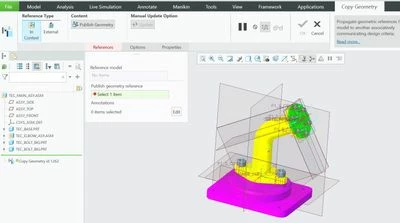
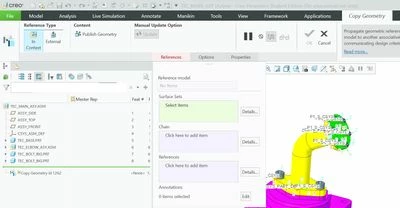
I couldn't find any way to move from one "version" to the other from "File->Options->Customize", so my main question is:
How can I switch between the different "versions"? (i.e., if I open one of them, but want to use the other "Model" toolbar, how can I do it?)
In addition,
What are the pros/cons of each "version"? Are they intended for different purposes?
Hope I managed to explain myself clearly enough.
Thank you