
1-Visitor
January 8, 2021
Question

Dimension tool not working (Creo 6.0)

  • January 8, 2021
  • 2 replies
  • 2361 views

Hello.

I've started using Creo 6.0 for my studies and school, however I quickly encountered a problem only I seem to have. I don't know if I'm simply doing a basic mistake or anything but when I want to change the dimension between the 2 opposite sides of an hexagon, the tool does nothing. I selected the 2 sides.
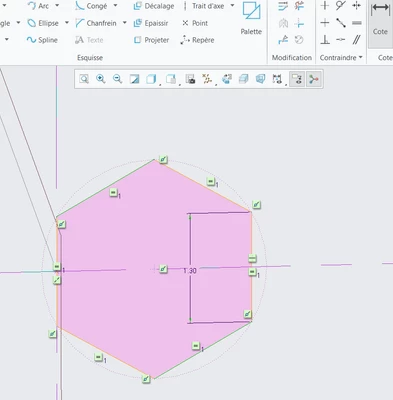
NT_9754214_0-1610092345371.png

Does anyone know how I can fix this?

I also can't switch to creo 7.0 due to the license provided by the school being only for version 6.

2 replies

24-Ruby III
January 11, 2021

@NT_9754214 wrote:

Hello.

I've started using Creo 6.0 for my studies and school, however I quickly encountered a problem only I seem to have. I don't know if I'm simply doing a basic mistake or anything but when I want to change the dimension between the 2 opposite sides of an hexagon, the tool does nothing. I selected the 2 sides.

NT_9754214_0-1610092345371.png

Does anyone know how I can fix this?

I also can't switch to creo 7.0 due to the license provided by the school being only for version 6.


Hi,

if you want to select two entities for dimensioning, you have to hold CTRL key.

1-Visitor
December 30, 2025

Click each object to have the dimension between them then middle mouse button click where you want the dimension, edit the dimension. Just fought through figuring this out, I'm sure most people who use the tool make an assumption new folks already know this, we don't. I came over from Autodesk Inventor and this is definitely unique to creo.