
1-Visitor
November 19, 2016
Solved

Error Message calling for geometric data

  • November 19, 2016
  • 1 reply
  • 12434 views

From Beginner Tom using Academic version.

When I go from Sketch to Extrude I often get this error message when I hit the OK green check.
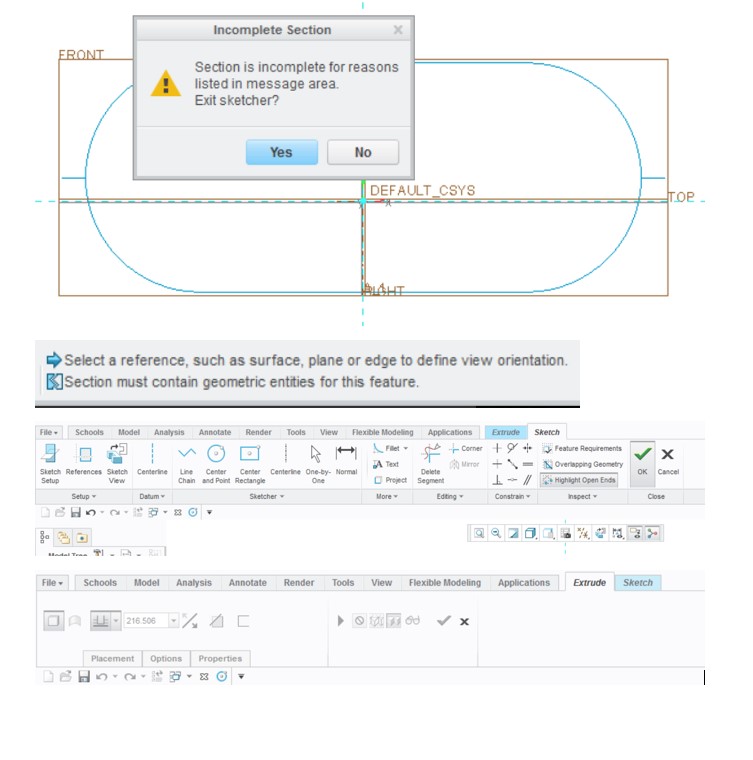
Creo Problem.jpg

"Incomplete Section" - reason - "Section must contain geometric entities for this feature"

Where did all the entities go?  Figure is blue.  What does blue color means?

    Best answer by Kevin

    Although the sketch is extruded it is a surface. The only way to extrude an open sketch as a solid is to select the thicken icon in the extrude dashboard. The orange color is a preview of what the geometry will look like and the dark blue identifies the geometry as surface geometry. As far as the error message are you creating the geometry as cunstruction geometry? There is an icon that can be selected that toggles whether the entities created are construction geometry (phantom lines) or sketch geometry (solid lines) which I don't see in your image. If you exit a sketch that just has construction geometry I don't believe you can get that geometry back. I'll try to upload some images if you don't find the options.

    1 reply

    1-Visitor
    November 19, 2016

    ‌Tom, your sketch does not for a single closed area and that is why Creo will not accept it for an extrude feature. While working on you're sketch, it should shade the interior of the closed area in yellow. If it does not, you will not be able to extrude with it. In your example, you have two small horizontal lines outside your oval. If you remove them you should be okay.

    There is is a set feature validation tools near the end of the Sketcher toolbar to check for closed area, overlapping entities and others. Use them to make sure you're sketch is what you expect it to be.

    torme1-VisitorAuthor
    1-Visitor
    November 19, 2016

    Thanks for the advice.  I found some validation tools under "inspect"

    Some weird results with unclosed sketches.

    AA.png

    After hitting Sketch OK

    BB.png

    Extrude

    CC.png

    After hitting Extrude OK

    DD.png

    No gray solid, of course.  But interesting new colors. 

    torme1-VisitorAuthor
    1-Visitor
    November 19, 2016

    Here we go again.  How do I recover geometric entities when I get this blue color?  Have I lost forever the data?  This is after I hit the OK button on Sketch, tried Extrude and got a 2D sketch, then went back to Sketch and got this error message.

    EE.png