

1-Visitor
May 11, 2018
Question

error opening creo parametric 3

  • May 11, 2018
  • 2 replies
  • 2218 views

I'm a student and i had to change pc, so i downloaded creofor student for the second time in this new pc. I have a problem and i can't understand how to solve it. Could you help please?

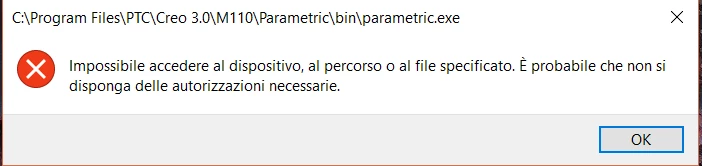
I have this error...

ps: in the previous pc it works without problem.Cattura.PNG
    2 replies

    23-Emerald III
    May 11, 2018

    Did you obtain a new license file for the new computer, if using a standalone version.

    If using a network license from your school, see your administrator.

    ded1-VisitorAuthor
    1-Visitor
    May 12, 2018

    It is a stand alone version and firstly i tried with the same license but, obviusly, it didn't work so i obtain a new license with the account of my sister(also a student) but I get that error message.I tried to unistall and reinstal creo but it persist. The setup program check the license correctly, could you suggest some other solution? Thanks a lot for helping

    23-Emerald III
    May 14, 2018

    When you requested the new license, did you specify the NIC address of your new computer? That is what controls the access.


    24-Ruby III
    May 15, 2018

    Hi,


    error message is telling you that C:\Program Files\PTC\Creo 3.0\M110\Parametric\bin\parametric.exe file does not exist.

    ded1-VisitorAuthor
    1-Visitor
    May 16, 2018

    So the problem is that the setup didn't work correctly? May i solve downloading the fourth version? 

    24-Ruby III
    May 17, 2018

    Hi,


    unfortunately I do not know what is going on on your PC. Try whatever you want 🙂