
6-Contributor
May 7, 2026
Solved

Error when renewing a student license
  • May 7, 2026
  • 5 replies
  • 152 views

Hello,

I’m using Creo Parametric 10.0.9.0 with a student license.

My license expired a few days ago, so I reissued it from the official website.
The PDF said to download Creo 12, so I downloaded Creo 12.
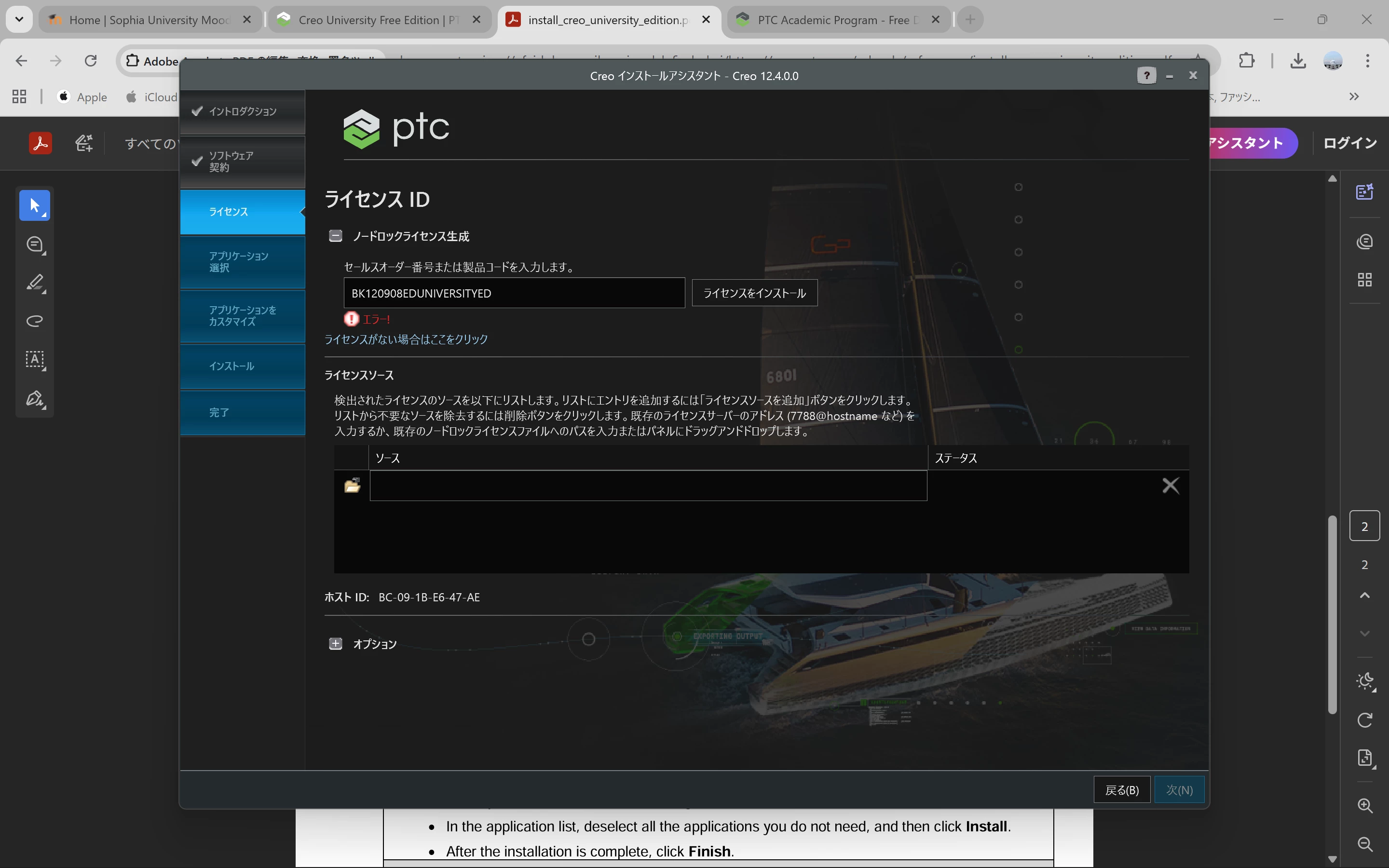
When I opened setup.exe and tried to enter the code, an error occurred and I couldn’t proceed any further.

I’ve deleted the old license from my PC’s folder.

If anyone knows a solution, I’d really appreciate your help.

Best answer by 駿神_11040331

My problem has been resolved!
I sent an email to "academicsupport@ptc.com," and they sent me the license (.dat) file directly. It took about one business day to receive a reply.

If you are stuck at the license entry screen, I recommend reaching out to them. I hope this helps others facing the same issue! ;)

5 replies

4-Participant
May 7, 2026

same issue

駿神_110403316-ContributorAuthorAnswer
6-Contributor
May 8, 2026

My problem has been resolved!
I sent an email to "academicsupport@ptc.com," and they sent me the license (.dat) file directly. It took about one business day to receive a reply.

If you are stuck at the license entry screen, I recommend reaching out to them. I hope this helps others facing the same issue! ;)

4-Participant
May 8, 2026

I already send a e-mail to academicsupport@ptc.com  but they are not respond how can I solve my problem.

6-Contributor
May 8, 2026

In my case, I followed these steps:


​First, I sent an email from my university email address. The next day, I tried requesting support via Teams through the AI chatbot at the bottom right of the official website.


​Shortly after, PTC Support canceled the meeting request, explaining that the free version is not eligible for live support. (I received an email notification about this at my university address.)


​Since I still hadn’t heard back from my initial inquiry, I sent another email with the same message from my personal email account. A few hours later, the license file finally arrived in my university email inbox (not the personal one).


​That’s everything I did. It seems that being persistent and trying different contact methods might help speed up the process.
​I hope this helps resolve your issue!

4-Participant
May 8, 2026

I had the same issue too. I have already sent an email to academicsupport@ptc.com since last Tuesday but they have not responded to me yet. I hope they will respond soon.

6-Contributor
May 9, 2026

Take a look at the replies I’ve written for other people!

4-Participant
May 8, 2026

I have the same issue too. I have already sent an email to academicsupport@ptc.com since last Tuesday but they haven’t responded to me yet. I hope they will respond soon.