
1-Visitor
March 25, 2014
Question

Freeform

  • March 25, 2014
  • 1 reply
  • 3483 views

How do I combine several freeform shapes to make an object that can be exported as an .STL file?
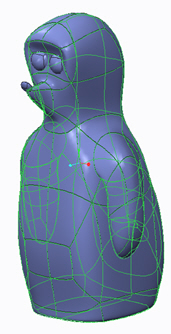
example.jpgThe eyes and nose of this animal are seperate freeform objects. I would like to extrude a cut through the "snout" to make a mouth. I'm sure somewhere I saw a command to convert freeform to object- I'm looking for some kind of boolean add command I think!

Any pointers?

Best regards

Peter

    1 reply

    1-Visitor
    March 25, 2014

    Peter, I love the character you have created.

    • After creating the overlapping freestyle features, select them all in the model tree (holding down Ctrl).
    • In the Model tab, Editing group, select Merge then OK in the ribbon.
    • With the Merge feature selected in the model tree, in the Model tab, Editing group, select Solidify then click OK in the ribbon.

    You now have a solid that can have the mouth shape removed maybe with a symmetric extrude.

    A zip of a model I created applying this technique is attached.

    Merge_freestlye.jpg

    PeterSach1-VisitorAuthor
    1-Visitor
    March 26, 2014

    Cheers Tim

    Struggling with this.

    Todays design intent....

    fairey-front.jpg

    I've modelled the fairy (weight for a ballon) have managed to combine the hear and the wings but cannot get the body to merge/solidify. I suspect it it because it is self intersecting.

    screen-fairy.jpg

    I've attached the file

    Many thanks for your help.

    Peter

    1-Visitor
    March 26, 2014

    You mention the most common reason for a shape failing to solidy/thicken.

    Look out for very tight curves and also the control frame overlapping. If solidify wont work try thicken with a very thin section. Creo should thicken most of the model (grey) but not the problem areas (blue) which help focus in on the surfaces that need tweaking..

    Freestyle_thicken_test.jpg

    I tried downloaded the zip file to take a look but the part had the wrong extension.

    Try uploading the native Creo part file and I will have a look.