

1-Visitor
March 26, 2021
Question

How do I run Creo 4.0 Student Edition offline?

  • March 26, 2021
  • 1 reply
  • 4536 views

I installed the student version of Creo 4.0 on my laptop and it runs fine as long as I have an internet connection, but if get this warning when I don't have an internet connection.
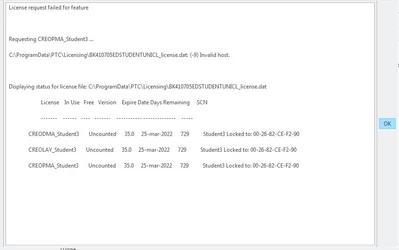
ptc-5167117_0-1616784777579.png

I have limited access to the internet, so I would like to run it offline.

Thanks for any help you can give me.

1 reply

24-Ruby III
March 27, 2021

@ptc-5167117 wrote:

I installed the student version of Creo 4.0 on my laptop and it runs fine as long as I have an internet connection, but if get this warning when I don't have an internet connection.

ptc-5167117_0-1616784777579.png

I have limited access to the internet, so I would like to run it offline.

Thanks for any help you can give me.


Hi,

when internet connection is ON, network card with MAC address 00-26-82-CE-F2-90 is enabled.

When internet connection is OFF, network card with MAC address 00-26-82-CE-F2-90 is disabled.

Open Command prompt window and launch ipconfig /all > ip.txt command in both situations and compare these files. I can check files if you can upload them.


1-Visitor
March 29, 2021

Hi, 

Here are the files you requested.

Thanks again for your help.

24-Ruby III
March 29, 2021

@ptc-5167117 wrote:

Hi, 

Here are the files you requested.

Thanks again for your help.


Hi,

in ip_online.txt I can see that MAC address 00-26-82-CE-F2-90 is assigned to Broadcom 4313GN 802.11b/g/n 1x1 Wi-Fi Adapter. Unfortunately I do not understand why it is not visible in ip_offine.txt.

Is Broadcom 4313GN internal or external adapter ?

Is Broadcom 4313GN disabled ?