
1-Visitor
March 22, 2016
Question

How do I save a clicked Item on a List Widget?

  • March 22, 2016
  • 2 replies
  • 2153 views

What I am trying to do, is list what sensors I have in a List Widget so that the user could click them or multi-click them to load into another list widget and save those particular items there. I want to be able to do this with multiple lists widgets and also I want to be able to select one of the many lists and turn it active, changing all the data in the list to a Boolean true.

Is there a way I can do this?

The picture shows what I have going on now, I can multi-click and those particular sensors will load into another list but will not save there. And I cant load more data into the other list their that I created. I also want to have a slider attached so that I can change those sensors from a Boolean False to and Boolean True.

Thank you,

Rachel
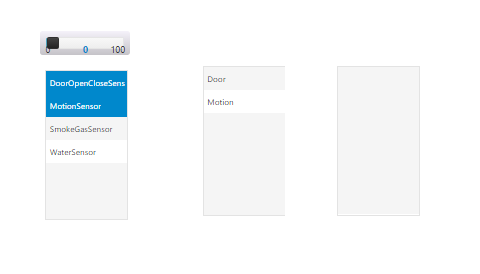
List.PNG

2 replies

1-Visitor
May 30, 2016

can you please let me know how you are getting the values in the second list?

I want to know .

1-Visitor
June 13, 2016

Hi Rachel,

I have same types of requirement.

Could you please let me know in details how you have achieved it.

Thanks & Regards,

Dheerendra.

5-Regular Member
June 13, 2016

Dheerendra, are you trying to link the two List widgets together? You can bind the 'All Data' from your service output to one, and then bind the 'Selected Rows' to the other widget. Once you do that, anything you select on the first List widget would show up on the second.

Make sure to select a value for the DisplayField.

1-Visitor
June 15, 2016

Aanjan, Thanks a lot for your guidance. Now its working.

Regards,

Dheerendra