1-Visitor
August 24, 2015
Solved

How to hide part labels or names?

  • August 24, 2015
  • 1 reply
  • 9528 views

I am quite new at creo and I am having problems when opening stl files on creo 3.0 the title of each part is visible. This makes it extremely hard to create models when I can't see the parts. If someone could give me some advice on that it would be great. Thank you so much.

    Best answer by sm_01

    Ah, thanks for clarifying. The brown lines and labels you see on the screen are called Datum Planes. These are infinite flat surfaces used as reference planes to orient the model, its corresponding geometry and assemble the component in an assembly. There are also Datum Points, Datum Axes and Datum Coordinate systems. All of these items are controlled in the Show group of the View tab.
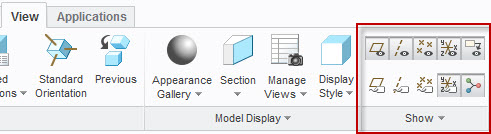
    viewdatums.jpg

    You can also change the display of these items very quickly with the on screen toolbar located in the graphics area.
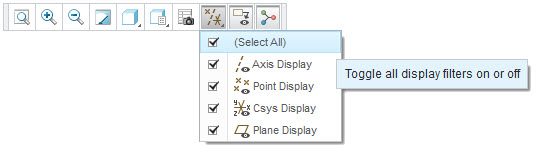

    onscreentoolbar.jpg

    1 reply

    1-Visitor
    August 24, 2015

    Can you clarify your question? Are you looking for a preview of the model before opening it? If they are native Creo files (.PRT) you can preview them by picking the Thumbnails option from the Views menu in the File Open window.

    creoopenpreview.jpg

    ppatel-31-VisitorAuthor
    1-Visitor
    August 24, 2015

    Actually I was referring to something else but I have no idea what it is called. As you can see the various parts in creo are labeled and have weird lines drawn through them. I would like to get rid of the titles of the parts so it would be easier to work with. Thanks.

    IUntitled.jpg

    sm_011-VisitorAnswer
    1-Visitor
    August 24, 2015

    Ah, thanks for clarifying. The brown lines and labels you see on the screen are called Datum Planes. These are infinite flat surfaces used as reference planes to orient the model, its corresponding geometry and assemble the component in an assembly. There are also Datum Points, Datum Axes and Datum Coordinate systems. All of these items are controlled in the Show group of the View tab.

    viewdatums.jpg

    You can also change the display of these items very quickly with the on screen toolbar located in the graphics area.

    onscreentoolbar.jpg
