1-Visitor
February 9, 2016
Solved

I cant give dimensions on Creo 3.0 student

  • February 9, 2016
  • 2 replies
  • 2005 views

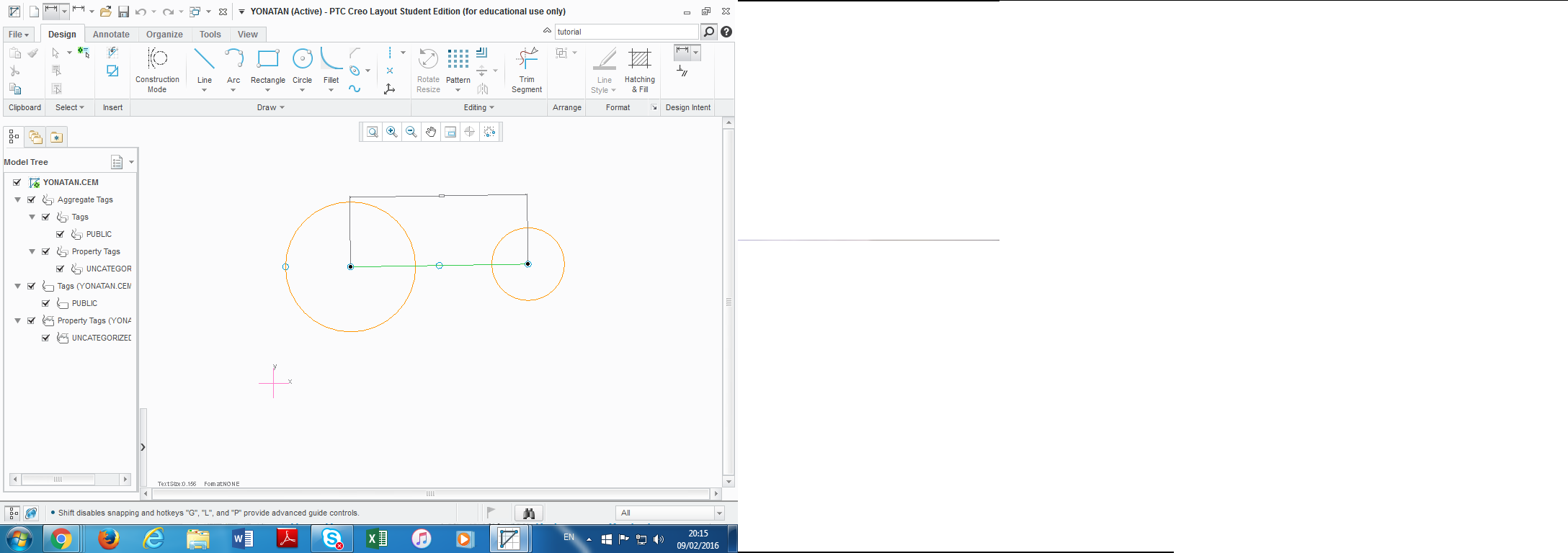
I installed the software today & cant give dimensions on creo 3.0 students version.

please help me, as you can see the line in the picture without the option to give dimension.

thanks a lot

PTC.png

    Best answer by MartinHanak

    Hi,

    are you sure you want to use Creo Layout application ? I would expect that you want to use Creo Parametric.

    Idea: Look at Annotate​ tab.

    MH

    2 replies

    1-Visitor
    February 9, 2016

    Hello,

    I would recommend upgrading your graphics card driver as this seems to be a graphics issue.

    Let me know how it goes.

    Chris

    yayalon1-VisitorAuthor
    1-Visitor
    February 10, 2016

    Chris thanks a lot for your reply.

    I run on my system solidworks, inventor and autocad perfectly well.

    I think it will be better to download an older version of creo ! what do you think?

    best regards and again thanks a lot

    Yonatan

    24-Ruby III
    February 10, 2016

    Hi,

    are you sure you want to use Creo Layout application ? I would expect that you want to use Creo Parametric.

    Idea: Look at Annotate​ tab.

    MH

    yayalon1-VisitorAuthor
    1-Visitor
    February 14, 2016

    Hi,

    Thanks a lot for your help.

    It turned out that Martin was right.

    As I used Creo Parametric there wasn't any problem to give dimension.

    Again thanks


    Best Regards

    Yonatan