

1-Visitor
August 26, 2019
Solved

Import Autodesk Inventor 2020 Files in Creo Illustrate Professional 6.0

  • August 26, 2019
  • 2 replies
  • 6903 views

Hello ladys and gentlemen,


first of all, i want to apologize for my bad english.

I'm a student from germany and i'm currently working on my technician project.

I already designed a 3D model of my machine in Autodesk Inventor 2020.

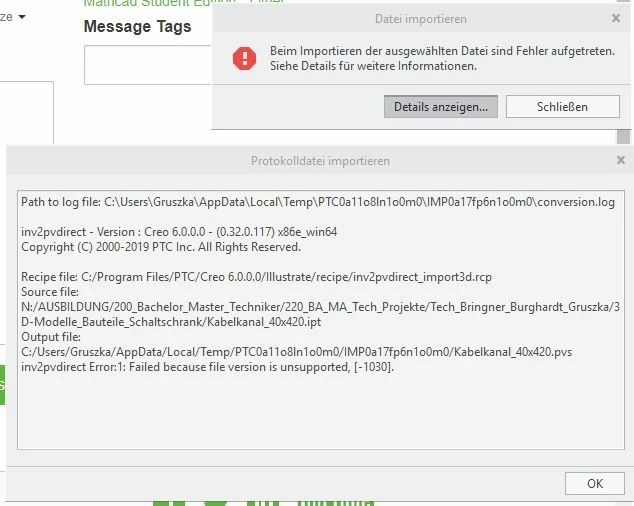
There are problems with importing both of  the autodesk inventor files (.ipt and .iam) into Creo Illustrate Professional 6.0. 

I attached the error log from Creo.
 

error log_creo6.0.JPG


Maybe someone can help me with my problem.


Best regards

Marco
Best answer by MartinHanak

@MarcoNFT wrote:

Hello ladys and gentlemen,


first of all, i want to apologize for my bad english.

I'm a student from germany and i'm currently working on my technician project.

I already designed a 3D model of my machine in Autodesk Inventor 2020.

There are problems with importing both of  the autodesk inventor files (.ipt and .iam) into Creo Illustrate Professional 6.0. 

I attached the error log from Creo.


error log_creo6.0.JPG


Maybe someone can help me with my problem.


Best regards

Marco

Hi,

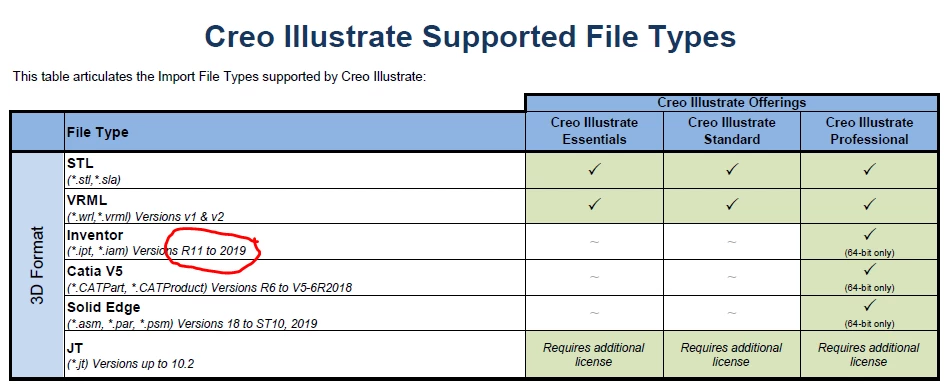
I guess that the answer is very simple ... in Creo Illustrate 6.0 the ability to open Autodesk Inventor 2020 file is not yet implemented. Usually it takes several months to implement the ability to read new file format.

On https://www.ptc.com/en/support/refdoc/compatibility/technicalgraphicscompendium_168055 page there is a link to PDF file containing Technical Graphics Compendium. On page 7 I can see this

inventor.png

2 replies

17-Peridot
August 26, 2019

Hello,


Please try importing the assembly in Creo Parametric first and save it from there as a PVZ. Illustrate works great with PVZ and Creo Parametric can import you assembly and convert it to PVZ.


Thanks,

Alex

MarcoNFT1-VisitorAuthor
1-Visitor
August 27, 2019

Hi,


thank you for the quick answer. 

We don't have Creo Parametric in our partnership package.

But I Think this wouldn't be the solution i looked for anyway.


I saw youtube tutorials, where Autodesk Inventor files were linked directly in Creo Illustrate.

The advantage is that i can change my 3D model in Inventor and i have directly the updated

model in Creo Illustrate.


Do you have another solution for my problem?

I mean there is the option to directly import Autodesk Inventor.

Import Files Creo.jpg


Best regards

Marco

24-Ruby III
August 27, 2019

You can use "STEP" file format as an option.

24-Ruby III
August 28, 2019

@MarcoNFT wrote:

Hello ladys and gentlemen,


first of all, i want to apologize for my bad english.

I'm a student from germany and i'm currently working on my technician project.

I already designed a 3D model of my machine in Autodesk Inventor 2020.

There are problems with importing both of  the autodesk inventor files (.ipt and .iam) into Creo Illustrate Professional 6.0. 

I attached the error log from Creo.


error log_creo6.0.JPG


Maybe someone can help me with my problem.


Best regards

Marco


Hi,

I guess that the answer is very simple ... in Creo Illustrate 6.0 the ability to open Autodesk Inventor 2020 file is not yet implemented. Usually it takes several months to implement the ability to read new file format.

On https://www.ptc.com/en/support/refdoc/compatibility/technicalgraphicscompendium_168055 page there is a link to PDF file containing Technical Graphics Compendium. On page 7 I can see this

inventor.png

MarcoNFT1-VisitorAuthor
1-Visitor
August 28, 2019

Ohh that's too bad. This should be the problem. Unfortunately i  looked over it. 

I guess i have to try to get an older version of Inventor and try to import my model there first.

Thank's for your help.


P.S. Is there already a date, when Autodesk Inventor 2020 Files are implemented in Creo 6.0?

24-Ruby III
August 28, 2019

@MarcoNFT wrote:

Ohh that's too bad. This should be the problem. Unfortunately i  looked over it. 

I guess i have to try to get an older version of Inventor and try to import my model there first.

Thank's for your help.


P.S. Is there already a date, when Autodesk Inventor 2020 Files are implemented in Creo 6.0?


Hi,

unfortunatelly I do not know when Autodesk Inventor 2020 file format will be recognized by Creo. I guess it will be Creo 7.0, not 6.0.