

1-Visitor
December 12, 2020
Question

Install licensing issue
  • December 12, 2020
  • 1 reply
  • 1914 views
  • IMG_20201212_201503.jpg

Hello,

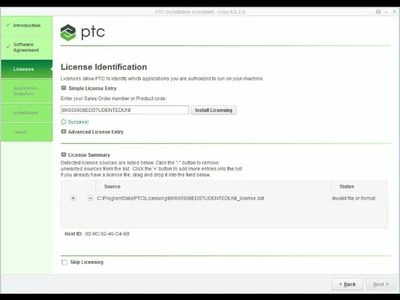
I'm trying to install the creo 6.0.2.0 but always getting the problem in install licensing.

It showing invalid file or format instead of available.

Tell me what i have to do now 

I attached a picture of that where I'm getting problem plz help me to solve this issue.

1 reply

24-Ruby III
December 14, 2020

@SS_9750705 wrote:
  • IMG_20201212_201503.jpg

Hello,

I'm trying to install the creo 6.0.2.0 but always getting the problem in install licensing.

It showing invalid file or format instead of available.

Tell me what i have to do now 

I attached a picture of that where I'm getting problem plz help me to solve this issue.


Hi,

please zip and upload your license file.

Also run ipconfig /all > ip.txt command from Command promt window and zip and upload ip.txt file.

I guess that the problem is related to network cards.

1-Visitor
September 15, 2021

Hi. I have absolutely same issue. could you please help me with this.

24-Ruby III
September 16, 2021

@AL_9435661 wrote:

Hi. I have absolutely same issue. could you please help me with this.


Hi,

your C:\ProgramData\PTC\Licensing\BK600908EDSTUDENTEDUNI_license.dat file does not contain license code, unfortunately I do not know why. Maybe @Alex_Cazacu can help to resolve your problem.

Sometimes some PTC routines have problem with non-english environment. Therefore you can:

  1. remove all files from C:\ProgramData\PTC\Licensing directory (I suggest moving them in other directory)
  2. launch installation in English ... see following example

install.png