3-Newcomer
May 22, 2025
Solved

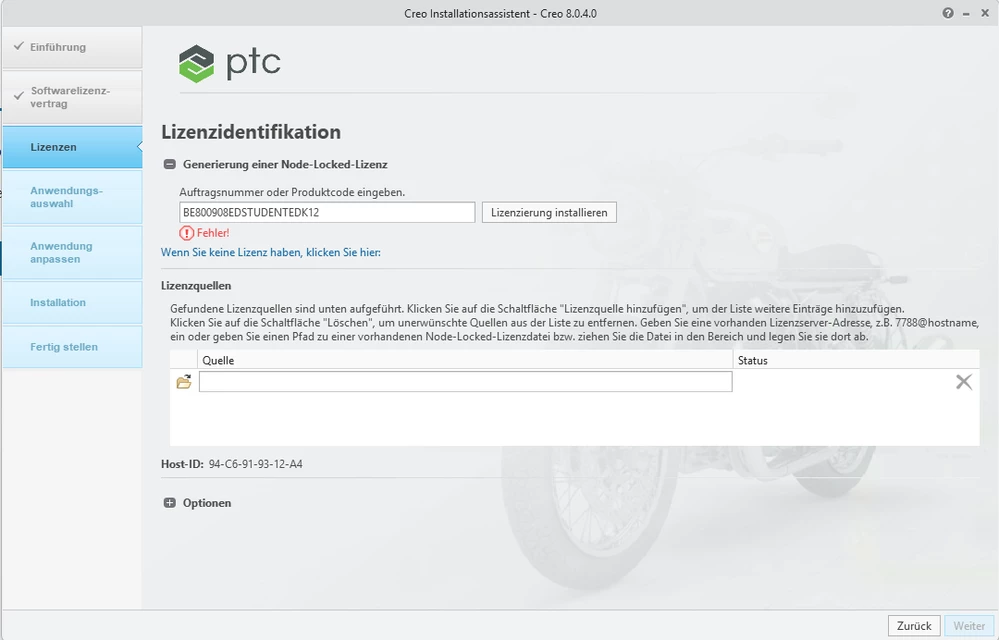
Installation Creo 8 - License Identification Error

  • May 22, 2025
  • 1 reply
  • 777 views

Dear PTC-Community,


I have the problem that when I use the license, which I got from my uni professor I get error message. But I already had the programm before and it worked with out any problems. I had to switch my C driver so I had to reinstall everything and now it doesnt work anymore. Does anybody know how to solve this issue, because I willneed it in a few days so I can finish my project.Screenshot 2025-05-10 191043.png
Best answer by MartinHanak

Hi,

please click on MartinHanak_0-1747977894464.png. Hopefully more detailed description of the error will be displayed.


Also you can download and install Creo 11,0 to get Creo license file and then use this file during Creo 8.0 installation.

Creo 11.0 product code: BE110908EDSTUDENTEDK12

Installation instructions ... https://apps.ptc.com/schools/references/install_creo11_schools_standard.pdf


License file directory ... C:\ProgramData\PTC\Licensing


1 reply

24-Ruby III
May 23, 2025

Hi,

please click on MartinHanak_0-1747977894464.png. Hopefully more detailed description of the error will be displayed.


Also you can download and install Creo 11,0 to get Creo license file and then use this file during Creo 8.0 installation.

Creo 11.0 product code: BE110908EDSTUDENTEDK12

Installation instructions ... https://apps.ptc.com/schools/references/install_creo11_schools_standard.pdf


License file directory ... C:\ProgramData\PTC\Licensing


3-Newcomer
May 23, 2025

Dear Martin Hanak,


I downloaded Creo 11.0 with your Installation instruction and everything works fine. Thank you very much for your support 😉