
1-Visitor
June 21, 2012
Question

Installation not listing Applications

  • June 21, 2012
  • 5 replies
  • 8773 views

Hello all,

I'm trying to install Creo 2.0 Student Edition using the Installation Assistant. I'm follow the instructions given in an email:

Step 1: Download Creo 2.0

Step 2: Creo 2.0 Student Edition Product Code

  • For the Student Edition you will need to enter the following product code during setup -BK390206EDSTUDENTUNICL

Step 3: Install Creo 2.0 Student Edition

  • Start setup.exe on your machine
  • Select Install New Software. Click Next.
  • Accept License agreement. Click Next.
  • Enter the student edition product code - BK390206EDSTUDENTUNICL. Click 'Install Licensing' to generate the license file. Once created, setup will add the license file to the license summary section. Click Next.
  • On the product screen, deselect MKS.
  • Click Install

So I choose "Install from the web" and go through everything as it says -- until I have to deselect MKS from the product screen. As you can see below, there is nothing listed, and the "Install" button is greyed out.
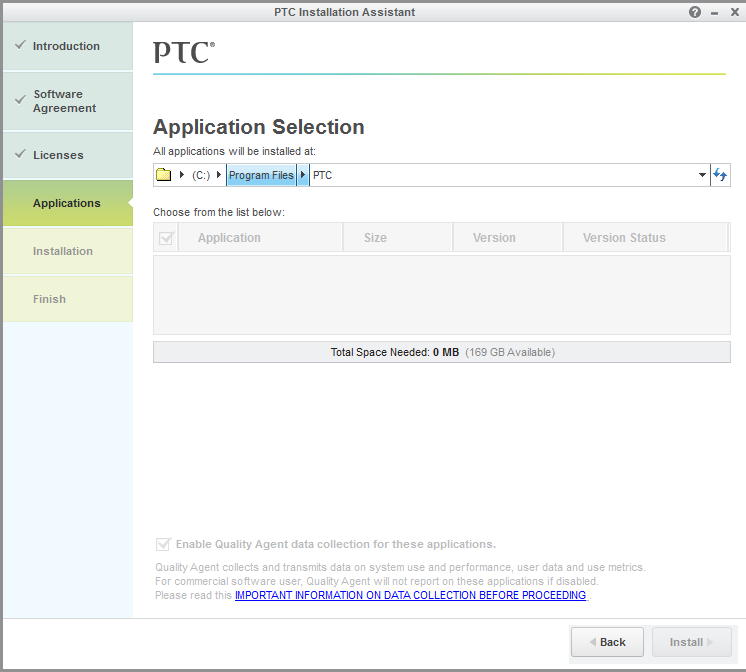
Untitled.png

I've tried rebooting, redownloading, etc. But everytime I end up here. If anybody has any ideas, I'd greatly appreciate the help.

Andrew

    5 replies

    June 22, 2012

    Andrew,

    I am told there are some problems with the web install. If you download the full media, you should be able to install from that. Sorry for the inconvenience.

    Regards,

    Adam

    1-Visitor
    July 4, 2012

    I also have the exact same issue. I also bought the 200$ student version, but where is the "the full media" you mention??. The only option I have is "Begin Download" after I purchase the product.

    July 6, 2012

    Enrique,

    Which version of the software do you need a download link for?

    Regards,

    Adam

    1-Visitor
    June 24, 2012

    I have the same issue with CREO 1.0 personal use. I have tried dowloading both the web install (12 hours) and then downloaded the full media (9 hours) and get the same problem. Is there a number to call to get "real time" help rather than send emails and wait 6 hours for responses?

    June 28, 2012

    Currently the web-install is only working for users who have commercial PTC accounts. Development is currently working to fix this.

    In the mean time, I realize that depending on your connection speed, downloading 4GB of data as one large chunck can be painful. In an effort to minimize this pain, I have hacked together a 5 part download (5 self extracting zip files). I just completed this a few hours ago so it has only been tested by me (it worked ). Please give them a try and let me know how it works.

    Download each of the 5 files and then run each executable, in order from 1 to 5. The default settings will extract all the files into a folder named "Creo2_M010_DVD".

    1. http://apps.ptc.com/schools/Creo2_M010_DVD-1.exe (just over 1GB)
    2. http://apps.ptc.com/schools/Creo2_M010_DVD-2.exe (just over 1GB)
    3. http://apps.ptc.com/schools/Creo2_M010_DVD-3.exe (just over 1GB)
    4. http://apps.ptc.com/schools/Creo2_M010_DVD-4.exe (just over 1GB)
    5. http://apps.ptc.com/schools/Creo2_M010_DVD-5.exe (just over 100 MB)

    Note that I have also had great success using Free Download Manager, it allows me to stop and restart the download as required. It can also be used to control the speed of the download. I was able to download the entire M020 DVD in just over 2.5 hours yesterday and my connection is not the best.

    I hope this helps at least some of you.

    Regards,

    Adam

    1-Visitor
    October 4, 2012

    Do you know how to register quality agent, I downloaded your zip files and everything is installed. When I try to open creo I get a message telling me to register quality agent, it says to report error 8

    1-Visitor
    June 25, 2012

    I have the same problem. Any solution, anyone?

    Regards,

    Lisa

    1-Visitor
    June 25, 2012

    I was sent this video from PTC and it got me up and running. They should probably provide a link to this video with the downloads.

    http://http://www.ptc.com/video/installation-process-for-creo-educational-editions

    1-Visitor
    June 26, 2012

    Hi Andrew,

    when you go back to the "License" step, does it have the proper license? You should be able to browse to that location and see all the licensed modules.

    Next, do you have the Creo 2 installation folder at c:\program files\ptc? If not, try changing the directory in the installation dialog to where you have downloaded the Creo 2 files. I think you have to unzip the package if it's still in zip format.