

1-Visitor
February 13, 2012
Question

Installing Creo Parametric 1.0 - HELP!

  • February 13, 2012
  • 3 replies
  • 3863 views

Hello,

I have the educational version of Creo, which I downloaded for free from this website.

While attempting to install the Parametric part of Creo, this window comes up before I can continue installing it. ss.PNG
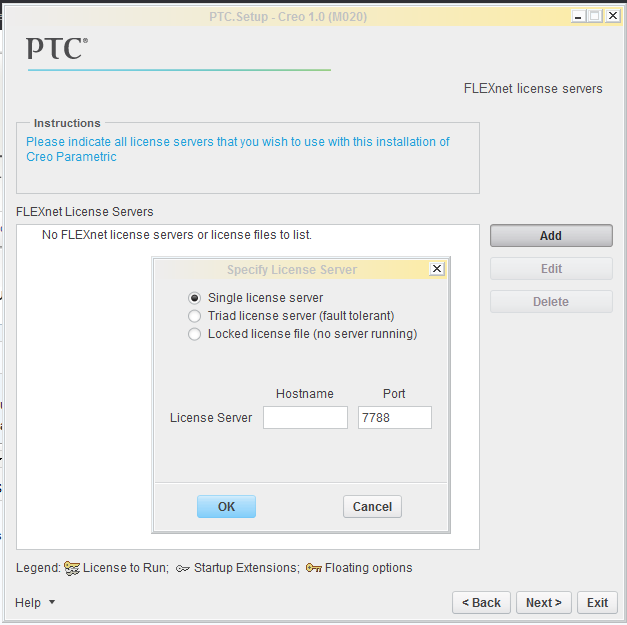
Question is, what do I put under "Hostname"?

(Assumed that I could put any word under "Hostname")

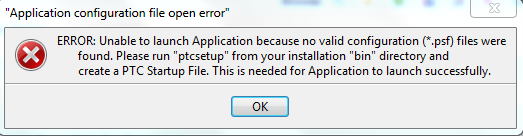
I entered my name, Kevin for example, and it allowed me to continue installing it. However, after I finished installing it, and when I try to open Parametric 1.0, I get this error.
s.PNG

Can anyone help me, please?!

Thanks,

Kevin.

    3 replies

    1-Visitor
    February 14, 2012

    Hi

    1.

    The First image is for License Option

    I am not sure which type of license you have;

    In our organisation we have a license server in network, and we use the Hostname of that PC

    2.

    The second one is for PTC Startup File(.psf file)

    PSF option generally appears when you have selected Advanced License Configuration during installation

    This facility enables you to select the bundle of license suitable for you at start if you have multiple types of Pro-e license sets

    lic.JPG

    I am not sure which type of license you have.

    Someone dealing with Educational verion can better explain you I believe

    Regards

    K.Mahanta

    February 17, 2012

    Kevin,

    I could be wrong but you are probably using the wrong license option. Most likely, you should be using the "Locked license file (no server running)" option.

    You should have received an email with your Product Code (SON) and a link to generate the license. You will be able to browse to this when you use the Locked license option. If you can't get it figured out, please enter a support request at: http://www.ptc.com/appserver/wcms/forms/index.jsp?&im_dbkey=132157&icg_dbkey=482.

    Regards,

    Adam

    1-Visitor
    February 18, 2012

    You should follow the comprehensive installation guide; everything you need to know to install the software is listed in there.

    As outlined, you'll need to obtain a license file using the PTC Install Manager, using your Sales Order Number which can be found in the e-mail which you get after waiting seven years.