1-Visitor
October 29, 2014
Solved

License issue with Creo 3
  • October 29, 2014
  • 3 replies
  • 3688 views

Capture.PNG

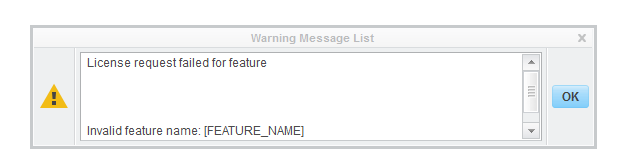
I installed Creo 3 with the provided license key, and I'm getting this error when trying to run it. I'm not really sure how to fix this.

    Best answer by MarkCheli

    Michael,

    A sure fire way to fix this is to go to the folder: C:\ProgramData\PTC\Licensing and delete all the licensing files there.

    Now reinstall Creo and you should be all fixed.

    3 replies

    1-Visitor
    October 30, 2014

    Me too. Exactly the same issue.

    5-Regular Member
    October 30, 2014

    Hi Shreyas,

    Did you have Creo 2.0 installed on your computer before? I think this might have something to do with it.

    Thanks!

    1-Visitor
    October 30, 2014

    I currently have 2.0 and am updating to 3.0 as we speak.

    I never saw that problem though.

    BTW: I am using the college/university link, maybe the issue is K-12 link only?

    5-Regular Member
    November 4, 2014

    Cai,

    It depends if you deselect the old Creo 2.0 license while installing or not. If you do , there should be no problems but if you don't then it will come up with this error.

    1-Visitor
    November 4, 2014

    I also have the same issue

    MarkCheli5-Regular MemberAnswer
    5-Regular Member
    November 6, 2014

    Michael,

    A sure fire way to fix this is to go to the folder: C:\ProgramData\PTC\Licensing and delete all the licensing files there.

    Now reinstall Creo and you should be all fixed.

    1-Visitor
    November 6, 2014

    Just FYI, C:\ProgramData is usually a hidden folder. The first part of this guide shows how to unhide it:

    http://apps.ptc.com/schools/references/support_programdata.pdf