1-Visitor
December 2, 2025
Solved

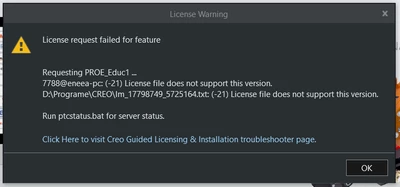
License request failed for feature
  • December 2, 2025
  • 2 replies
  • 534 views

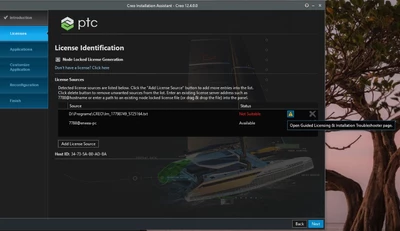
ER_14419908_0-1764667383782.png

ER_14419908_2-1764667521511.png

I am a student at the Faculty of Industrial Engineering and Robotics (FIIR) at the Polytechnic University of Bucharest. I have a license from my school, it is valid but creo 12.4.0.0 does not recognize it, i have removed it once and reinstalled it. Please help me.


Best answer by Alex_Cazacu

Uninstall all Creo versions installed and run a fresh Creo 11 install.

Make sure you run setup.exe as an administrator! Also make sure that you turn off during the installation any security software that runs on your device, you can also get offline as you have a license.

Use the existing available license and don't try to add the server license in the client setup, it will not work.

First time you run Creo 11 after the installation make sure you run it as an administrator!

2 replies

24-Ruby III
December 2, 2025

Hi,

I guess your license contains Creo 11.0 license.

Open license file in Notepad and search for line starting with INCREMENT PROE_Educ1 ptc_d xx.0

xx.0 determines the Creo version

Creo 7.0	38.0
Creo 8.0	39.0
Creo 9.0	40.0
Creo 10.0	41.0
Creo 11.0	42.0
Creo 12.0	43.0


1-Visitor
December 2, 2025

Do I need to change from 42.0 to 43.0 on every increment find or just to this specific one  INCREMENT PROE_Educ1 ptc_d?


1-Visitor
December 2, 2025

ER_14419908_0-1764674609436.png


17-Peridot
December 9, 2025

Uninstall all Creo versions installed and run a fresh Creo 11 install.

Make sure you run setup.exe as an administrator! Also make sure that you turn off during the installation any security software that runs on your device, you can also get offline as you have a license.

Use the existing available license and don't try to add the server license in the client setup, it will not work.

First time you run Creo 11 after the installation make sure you run it as an administrator!