1-Visitor
November 20, 2020
Solved

License request failed for future - student version 7.0

  • November 20, 2020
  • 2 replies
  • 2587 views

Screenshot (1).pngScreenshot (2).pngScreenshot (3).pngScreenshot (4).png

Best answer by MartinHanak

@PT_9721946 wrote:

i did attach the file


Hi,

I can't find 3A-A6-8F-33-71-77 in ip.txt file. Therefore you cannot use your license file to launch Creo.

I am not sure whether PTC installer work well when your computer is connected to Internet via Remote NDIS based Internet Sharing Device (22-F6-4F-3C-12-86).

Suggestion: Connect to Internet via Realtek PCIe GBE Family Controller (8C-16-45-6B-B2-97) and disable all other network cards. Then uninstall Creo, clean C:\ProgramData\PTC\Licensing directory and install Creo.

2 replies

1-Visitor
November 24, 2020

why no one is replying is to my problem I am facing with the software license request failed for feature

pls help me

24-Ruby III
November 24, 2020

Hi,

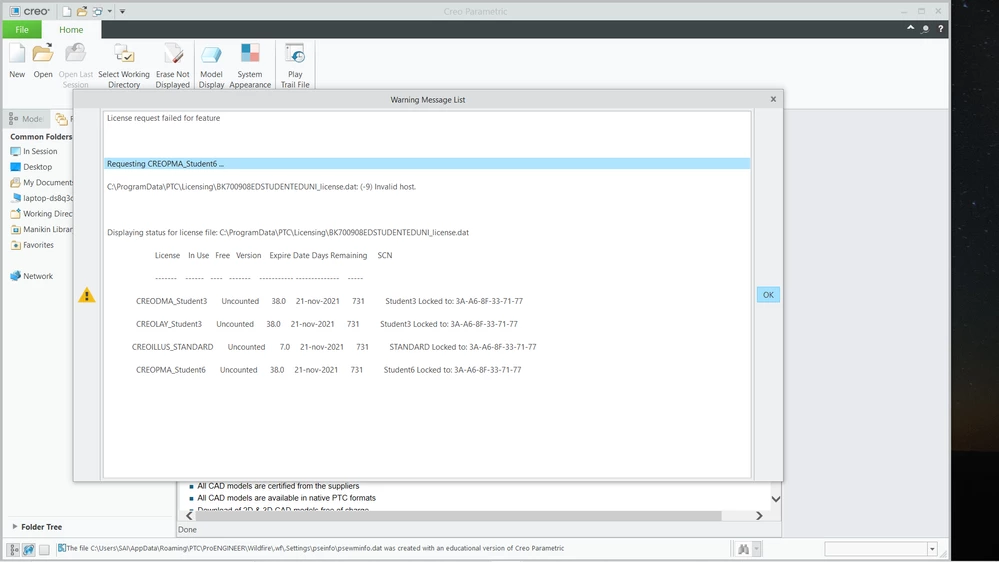
license file mentioned on 1st picture contains license generated for network card with MAC address 3A-A6-8F-33-71-77.

Invalid host error message tells you that Creo did not found network card with MAC address 3A-A6-8F-33-71-77.

Suggestion:

  • open Command prompt window
  • run ipconfig /all > ip.txt command
  • upload ip.txt file
  • I will check contents of ip.txt file


1-Visitor
November 24, 2020

i did attach the file

24-Ruby III
November 24, 2020

@PT_9721946 wrote:

i did attach the file


Hi,

I can't find 3A-A6-8F-33-71-77 in ip.txt file. Therefore you cannot use your license file to launch Creo.

I am not sure whether PTC installer work well when your computer is connected to Internet via Remote NDIS based Internet Sharing Device (22-F6-4F-3C-12-86).

Suggestion: Connect to Internet via Realtek PCIe GBE Family Controller (8C-16-45-6B-B2-97) and disable all other network cards. Then uninstall Creo, clean C:\ProgramData\PTC\Licensing directory and install Creo.