
1-Visitor
December 10, 2016
Solved

Licensing error

  • December 10, 2016
  • 2 replies
  • 1714 views

I've been using Creo for months. It just suddenly began to act up today. Every time I try to log in, I receive this error message:ERROR.JPG
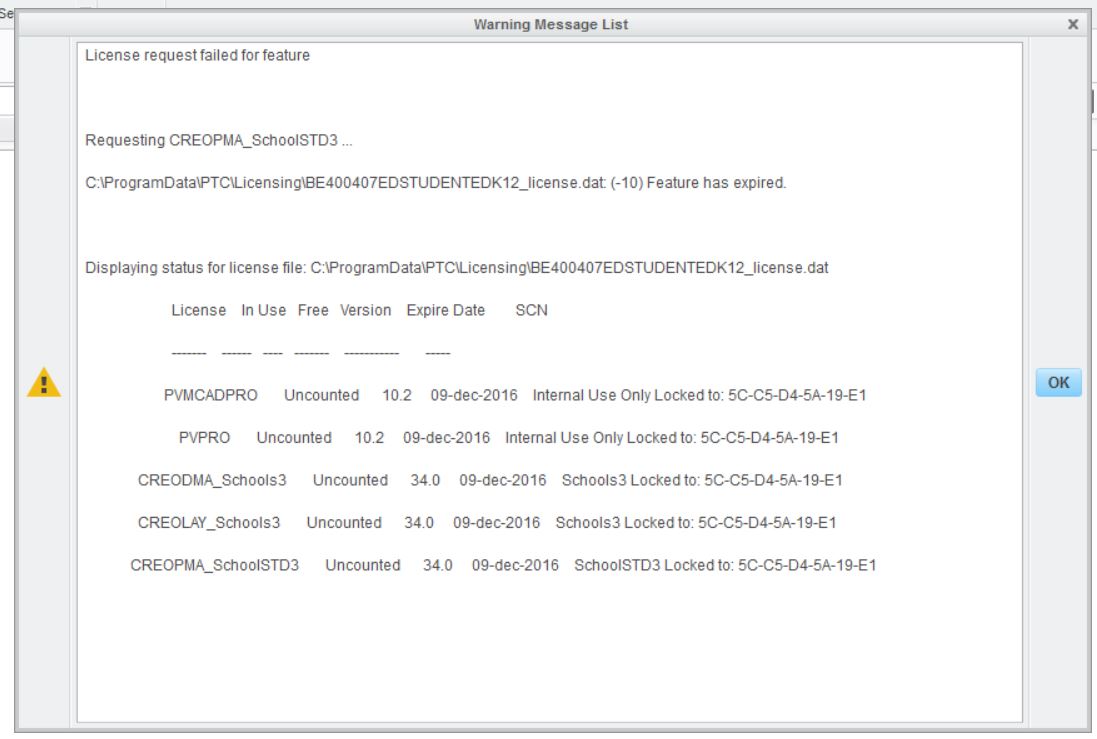
I don't understand why I need a license, I'm using the student version. What does this mean and how do I get this to stop?

    Best answer by aabdulkarim

    Perhaps, the computer reached out to the old license. please try this again if you see any license in the License Summary box click minus to remove them. If you still have a problem send me a screenshot at -

    2 replies

    13-Aquamarine
    December 12, 2016

    Hi Royal,

    Your Creo 3.0 Schools standard has expired.

    Please follow the steps of installation guide of Creo 3.0 Schools Standard below to install it.

    http://apps.ptc.com/schools/references/install_creo3_schools_standard.p.df


    relder1-VisitorAuthor
    1-Visitor
    December 12, 2016

    I tried this, and it didn't solve my problem. I received the same message as before.

    13-Aquamarine
    December 12, 2016

    Perhaps, the computer reached out to the old license. please try this again if you see any license in the License Summary box click minus to remove them. If you still have a problem send me a screenshot at -