1-Visitor
July 20, 2014
Solved

.mtl library in windchill

  • July 20, 2014
  • 1 reply
  • 2677 views

I have a problem and I hope enyone could help me with that.

How can I create a .mtl library at the First Windchill server?

I save the .mtl-file in my workspace but i couldn't check it in. Also the .mtl-file was not shown in my workspace at my browser.

What do I wrong?
    Best answer by sm_01

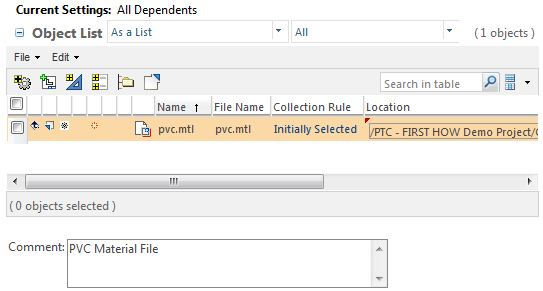
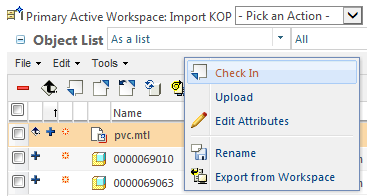
    Robert, assuming you are in Creo, the Material file (.MTL) can be checked into your Windchill Project in any folder. Just right click on the file, wait for the menu to appear and then pick Check In. This option is only available while viewing the workspace from within Creo, not the browser.

    Material File located in Workspace (Creo)

    Mtl+file+in+workspace.png

    Check In Process

    mtl+file+checkin.png

    1 reply

    sm_011-VisitorAnswer
    1-Visitor
    July 28, 2014

    Robert, assuming you are in Creo, the Material file (.MTL) can be checked into your Windchill Project in any folder. Just right click on the file, wait for the menu to appear and then pick Check In. This option is only available while viewing the workspace from within Creo, not the browser.

    Material File located in Workspace (Creo)

    Mtl+file+in+workspace.png

    Check In Process

    mtl+file+checkin.png

    robwood1-VisitorAuthor
    1-Visitor
    July 29, 2014

    This mean i must wait until Windchill 10.2 is online!!

    Because I have Windows 8.1.

    1-Visitor
    July 30, 2014

    Yes, once you have moved up to Windows 8.1, there is no way to run anything other than IE11 which is not compatible with Creo 2.0 or Windchill 10.1. The goal is to have it ready for September 1st.