
1-Visitor
December 10, 2013
Solved

Plane with angular offset?

  • December 10, 2013
  • 1 reply
  • 4724 views

Hi,

A while since the last time I used Creo, so a beginner question

I recently re-installed Creo.

Now I am starting to model, I'd like to make a datum plane with angular offset.

I click the plane in the datum group.

Then I select a plane for which I want the new datum plane go through (I select the through from the drop down menu.).

I try to select one more plane using control button. I can not select more planes or objects as references (The datum plane placement window is open.)

How to proceed forward?
    Best answer by ptc-5008082

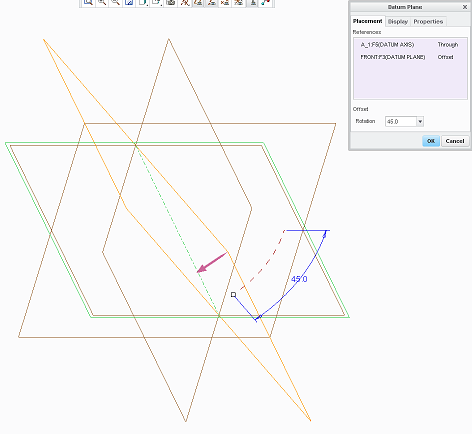
    You will need an axis to act as a pivot and a plane to measure the offset angle from - use the <Ctrl> key to pick the two references

    plane.png

    1 reply

    JKK1-VisitorAuthor
    1-Visitor
    December 10, 2013

    Seems as if the angular offset needs at least one axis to function.

    1-Visitor
    December 10, 2013

    You will need an axis to act as a pivot and a plane to measure the offset angle from - use the <Ctrl> key to pick the two references

    plane.png