1-Visitor
July 4, 2016
Solved

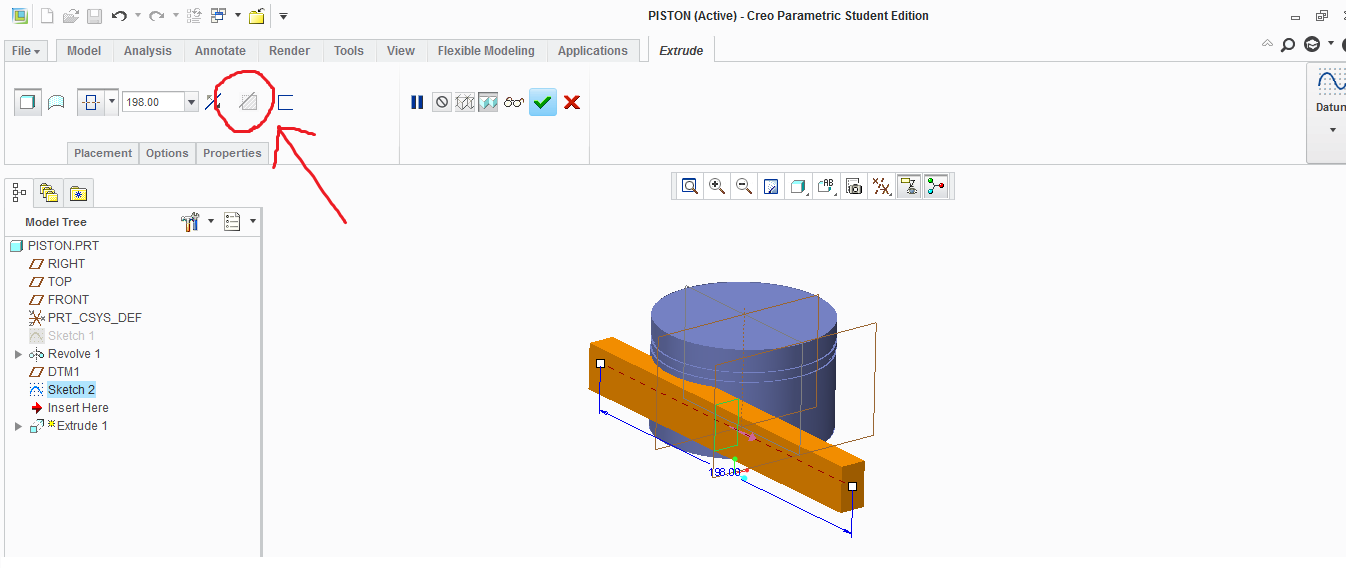
Please Help. I Cant remove Material, "Remove Material" Greyed out!!!

  • July 4, 2016
  • 2 replies
  • 6001 views

remove material.png

    Best answer by dschenken

    I can't tell, but is "Revolve 1" a surface? It's not possible to remove material from a surface with solid operations.

    That's the only thing that occurs to me. If that isn't it, use the advanced editor (the nearly invisible text in the upper right corner of the Reply editor window) to add the file.

    I don't have an academic copy, so I can't open it, but other users may want to, if "Revolve 1" is not a surface.

    2 replies

    dschenken1-VisitorAnswer
    1-Visitor
    July 7, 2016

    I can't tell, but is "Revolve 1" a surface? It's not possible to remove material from a surface with solid operations.

    That's the only thing that occurs to me. If that isn't it, use the advanced editor (the nearly invisible text in the upper right corner of the Reply editor window) to add the file.

    I don't have an academic copy, so I can't open it, but other users may want to, if "Revolve 1" is not a surface.

    24-Ruby III
    July 7, 2016

    I am almost sure "Revolve 1" is a surface, because of its color.

    MH

    apatel-31-VisitorAuthor
    1-Visitor
    August 6, 2016

    yep, Got it can't remove material from surface.THANKS FOR HELP!!! PCASM.png.