1-Visitor
April 17, 2013
Question

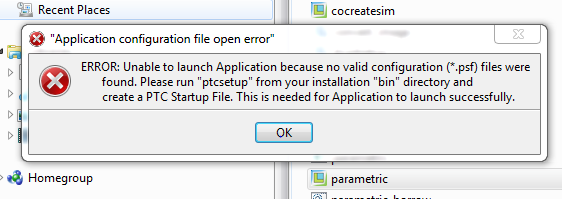
Problem opening Creo2.0 in my laptop.

  • April 17, 2013
  • 1 reply
  • 2393 views

ERROR.PNG

    1 reply

    April 17, 2013

    Have you done as the message says? Creo will not run without a valid .psf file.

    1-Visitor
    April 18, 2013

    I tried clicking at the ptcsetup from my "bin" directory but nothing happened. How do I crate a valid .psf file?

    1-Visitor
    April 18, 2013

    When you go to the bin directory at C:\Program Files\PTC\Creo 2.0\Parametric\bin:

    1.) Right-click reconfigure.exe and run as administrator. This will open up the PTC Installation Assistant.

    2.) Step through the process by click Next.

    3.) In the Applications to Customize section, accept the default selections (including Enable Quality Agent) and then click Install.

    This process should create the proper .psf file in your bin directory. If this doesn't work, please let me know.

    Regards,

    Curtis Siebenaller