

1-Visitor
April 22, 2012
Solved

Problem Starting CREO Parametrics

  • April 22, 2012
  • 1 reply
  • 5103 views

Hi,

I cant open CREO parametric (School Edition), i didnt get a message it just doesnt start...

i tought it can be a Compatibility issue but i already check it and .. nothing happends.

Please Help.

Im using a Macbook Pro, but i have Windows 7 home premium on it.

Thank you
    Best answer by

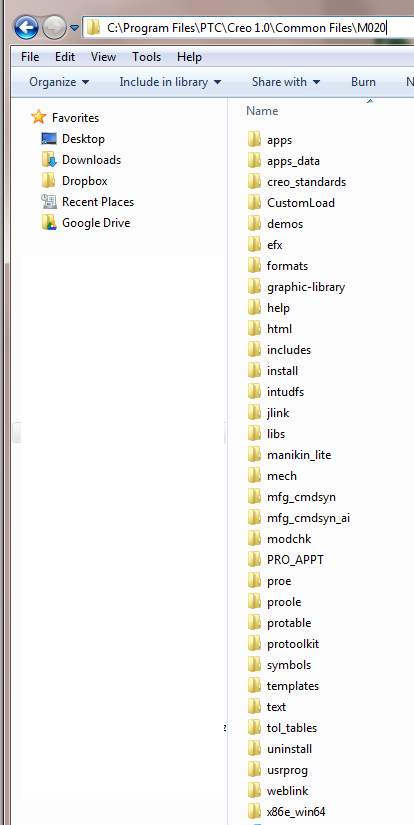
    Looks like your installation did not complete then, you should try reinstalling. You should see many folders inside of M020.

    m020_folders.png

    1 reply

    April 24, 2012

    This sounds like a graphics issue. I am not familiar with the way Windows 7 works on a MAC, is it possible for you to update the graphics driver? That is the first step I would take.

    If the graphics driver can't be updated, try this:

    1. Use Wordpad to open the file C:\program files\PTC\Creo 1.0\Common Files\<BUILD NUMBER>\text\config.pro.
    2. Add a line of text with the following option: "graphics win32_gdi".
    3. Save the file and start Creo again.
    1-Visitor
    April 26, 2012

    Im sorry but i cant finf de Folder "Text"

    And i dont think it would be the graphic driver because i just downloaded

    April 26, 2012

    The path will be C:\program files\PTC\Creo 1.0\Common Files\<BUILD NUMBER>\text, where <BUILD NUMBER> is the build number of the Creo version that you installed.

    For example, it may be C:\program files\PTC\Creo 1.0\Common Files\F000\text or if you have installed the latest M020 version it would be C:\program files\PTC\Creo 1.0\Common Files\M020\text.