Solved
PTC Creo 9.0 University Student Edition Premium / Installation problems
Dear Sir or Madam,
I purchased the Creo Student Premium Edition on 26.07.2022 and sent my certificate of enrollment to ptc.nam@digitalriver.com on the same day . On 29.07.2022 I received the order confirmation with my product code.
To my problem:
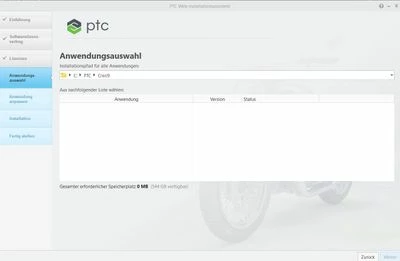
After calling the installation, I was able to generate the license with my received product code. However, in the next step, the application selection is empty and I could not proceed with the installation. I tried it again today and now the error message "You have reached the maximum number of license requests available for your product type" comes up when creating the license.
I hope you can help me.
Kind regards
Roman Sauer
I purchased the Creo Student Premium Edition on 26.07.2022 and sent my certificate of enrollment to ptc.nam@digitalriver.com on the same day . On 29.07.2022 I received the order confirmation with my product code.
To my problem:
After calling the installation, I was able to generate the license with my received product code. However, in the next step, the application selection is empty and I could not proceed with the installation. I tried it again today and now the error message "You have reached the maximum number of license requests available for your product type" comes up when creating the license.
I hope you can help me.
Kind regards
Roman Sauer