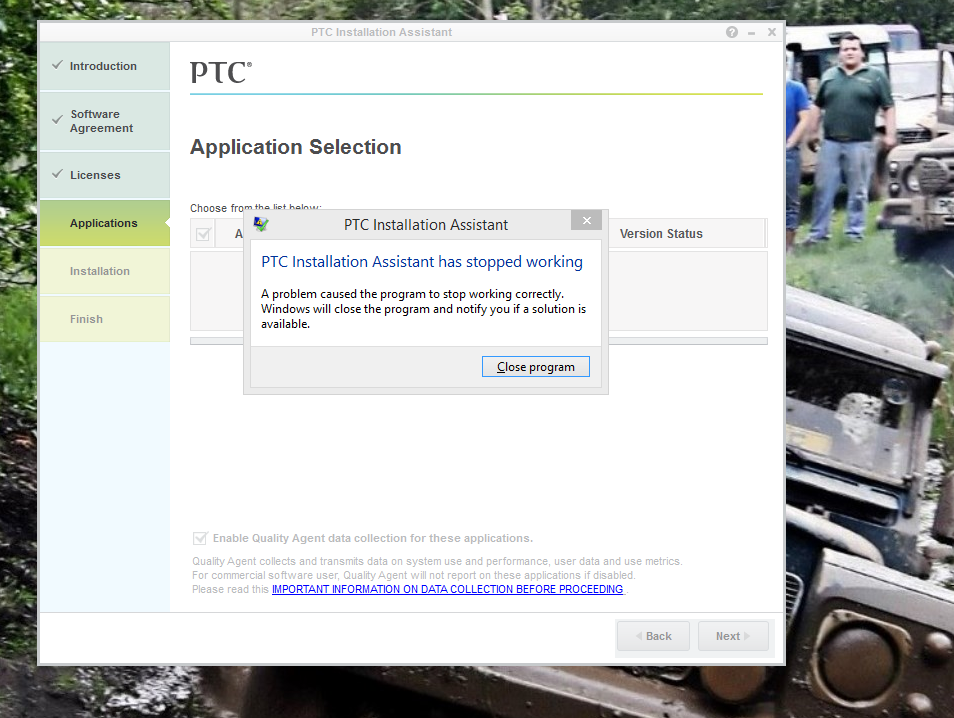
PTC installation assistant error
Hi,
I have purchased an academic copy of Creo 2 online and downloaded the installer and ran it as an administrator.
the installer starts taking me through the steps to completion and recognizes my supplied licence for the product, however when it comes to the “Applications” section it crashes and the error message “PTC installation assistant has stopped working” is produced. Please find attached a screenshot of this message.
I have browsed the forum and this seems to be a fairly common issue but no simple answer seems to have been given on there. At first I assumed that it must be my schools edition of Creo/Elements Pro needing uninstalling in order to complete the process, so I uninstalled that but it made no difference. I have tried downloading another copy of the installer but this also does not work.
is there something that I am missing or is there a bug in the installer that I have?
Kind Regards,
Mike