

1-Visitor
February 14, 2024
Question

Section must contain geometric entities
  • February 14, 2024
  • 4 replies
  • 2038 views

SS_10923286_0-1707943345883.png

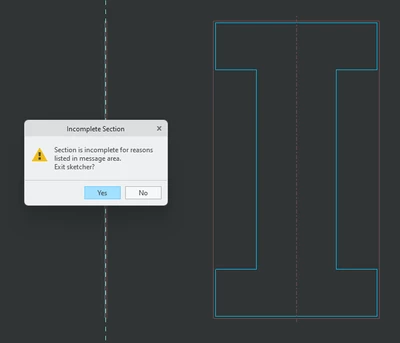
Hello, I am trying to revolve this part. I have redrawn this part 5 times and it refuses to accept it. Its closed, there are no gaps, I set the middle line as the axis of revolution. Can somebody please tell me what im doing wrong

4 replies

1-Visitor
February 14, 2024

I also have the message no text entities allowed when i have not added any text entities

1-Visitor
February 14, 2024

I should also note I have tried to draw half the shape with the centerline in the same spot but it still gave me the same error despite the shape being closed

1-Visitor
February 14, 2024

SS_10923286_0-1707945363081.png

I solved this, im honestly not sure how. It decided to accept it on my 3rd time drawing half of it, even though it was still saying must contain geometric entities and no text entities allowed. Pic is from before confirming sketch, as soon as i confirm sketch it is no longer a geometric entity and I cannot get it to register as one


1-Visitor
February 14, 2024

Ok i just put a plain circle down and tried to extrude it and get the same message section must contain geometric entities. Why?????? 

SS_10923286_0-1707950527682.png

Please explain


24-Ruby III
February 15, 2024

Hi,

ask Youtube to find creo revolve feature and watch video(s). Eg. https://www.youtube.com/watch?v=nps3XO3eYAY


1-Visitor
May 5, 2024

I had the exact doubt too, the video got me clarified. Thanks!