
1-Visitor
March 17, 2016
Solved

Sketch projected onto a curved Surface

  • March 17, 2016
  • 3 replies
  • 8982 views

Hi all

Just playing around with features of Creo that I haven't used before - I have created a sketch on a Datum surface and then projected it onto the surface of a cylinder

as shown:cylinder.png
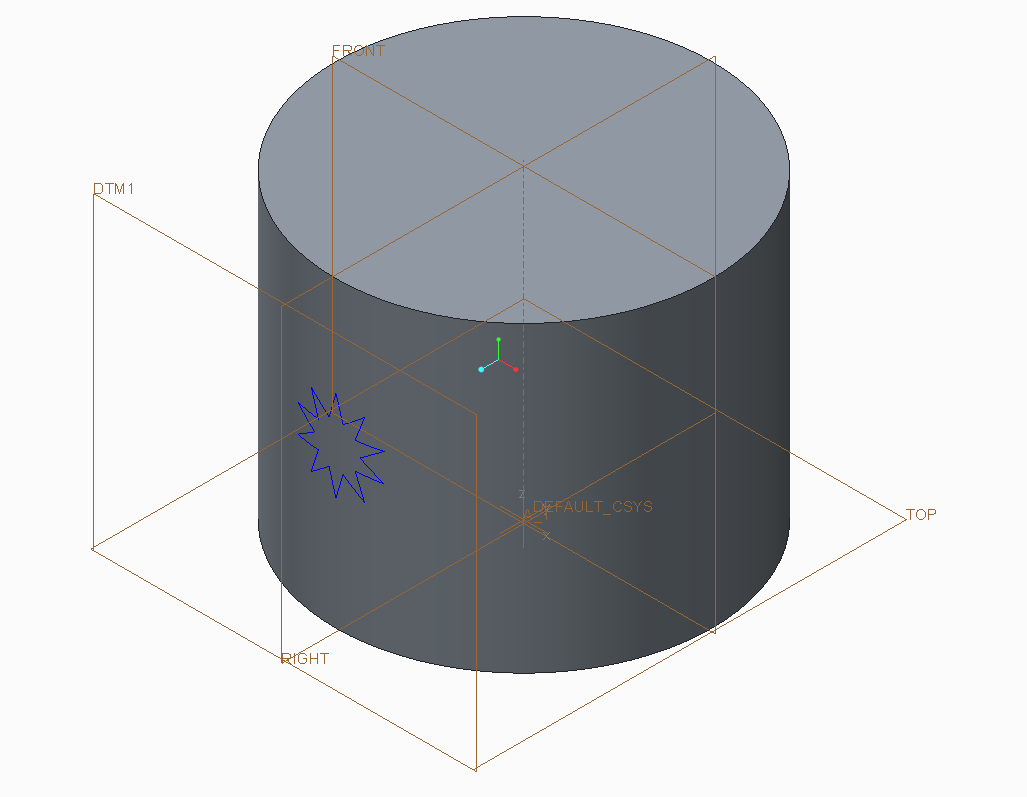
So the question now is what can I do with it? It no longer behaves as a sketch and won't extrude so if anyone could enlighten me as to the possibilities I would be most grateful.

Not trying to do anything special - just trying stuff out!

Thanks

    Best answer by tbrotherhood

    ‌if it's a single spline try sweeping a shape along it.  I use this technique to remove material to create door and headlight outlines on car bodies.

    3 replies

    12-Amethyst
    March 17, 2016

    ‌if it's a single spline try sweeping a shape along it.  I use this technique to remove material to create door and headlight outlines on car bodies.

    1-Visitor
    March 17, 2016

    Hi Tim

    Nice one! That's got me going - any more suggestions welcome!

    cylinder2.png

    Cheers

    Roy

    1-Visitor
    March 17, 2016

    spring_washer.jpgHi Roy

    I used it to sweep a shape to create a spring washer  I will post the part so you can play with it.  I projected the sketch onto a surface; used the projection as a trajectory and hid the surface.  Parts of the sketch referenced the other features in the model. Have fun.

    1-Visitor
    March 17, 2016

    Hi John

    A nice idea. Look forward to the posting.

    Roy