
1-Visitor
November 2, 2014
Solved

Software not recognizing license

  • November 2, 2014
  • 1 reply
  • 950 views

I have installed creo 3.0 using the steup.exe file. When I go to open the software, it says "License Request Failure". Does the License have to be located in a particular directory in order for the software to locate it? I have a feeling the software is looking at a my previous lecense for creo 2.0.
    Best answer by MarkCheli

    Hi Maxime,

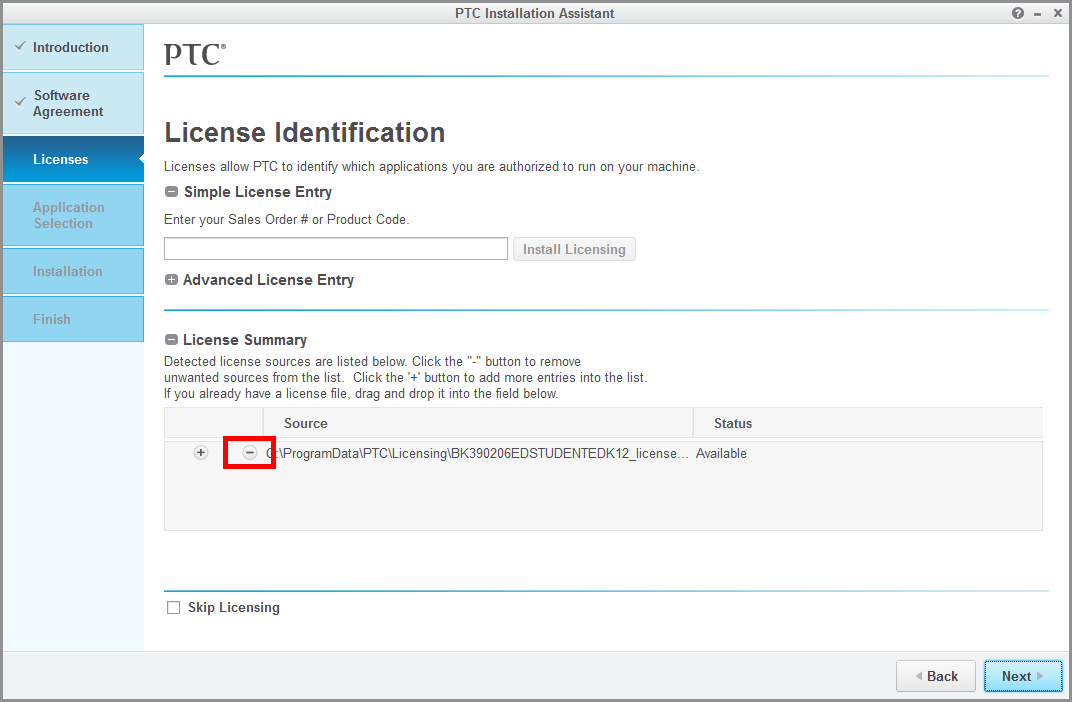
    That is likely correct that it is looking for your previous license. I would recommend re-installing Creo 3.0 but this time when you get to the licensing step of the install, make sure to deselect your old licenses before generating a new one. A screenshot of this is shown below...

    11-4-2014+2-26-54+PM.png

    Please let me know if you have any questions!

    1 reply

    MarkCheli5-Regular MemberAnswer
    5-Regular Member
    November 4, 2014

    Hi Maxime,

    That is likely correct that it is looking for your previous license. I would recommend re-installing Creo 3.0 but this time when you get to the licensing step of the install, make sure to deselect your old licenses before generating a new one. A screenshot of this is shown below...

    11-4-2014+2-26-54+PM.png

    Please let me know if you have any questions!