

3-Newcomer
August 21, 2023
Solved

Standard Views Missing on Importing Creo 6 file

  • August 21, 2023
  • 1 reply
  • 2492 views

Hi All,

I've just dug out on old creo parametric file (attached in zip file) and opened in Parametric 9. When I look under View->Saved Orientations I don't get the standard lists of Front, Back, Top etc (see screenshot below). Do I need to somehow convert to latest Creo version to recover that, or is there something else I should do? Or do I need to start again?

Any tips appreciated.

Thanks

Shaun
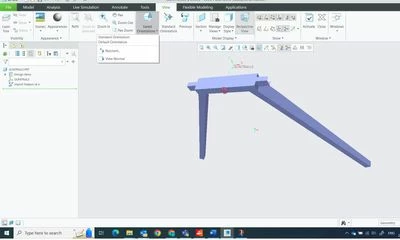
Creo View Screenshot 2023-08-21.jpg

Best answer by MartinHanak

https://www.youtube.com/watch?v=XBJyCRPPOp4


1 reply

24-Ruby III
August 21, 2023

Hi,

in the past someone simply used File > Import command without any other configuration to open import file in Creo. Because of this resulting file does not contain standard list of views. You have to create standard list of views manually.


Next time ... during import click Details button and set template which will be applied.

MartinHanak_0-1692619706689.png MartinHanak_1-1692619776680.png


Shaun_F3-NewcomerAuthor
3-Newcomer
August 22, 2023

Hi Martin,

Thanks for your help - but I cannot see File > Import. I'm using the Educational Edition and all I see is File > Open as below.

SF_4694462_0-1692695229170.png

The part file is over 10 years old so maybe its just too old to be properly read.

24-Ruby III
August 22, 2023

@Shaun_F wrote:

Hi Martin,

Thanks for your help - but I cannot see File > Import. I'm using the Educational Edition and all I see is File > Open as below.

SF_4694462_0-1692695229170.png

The part file is over 10 years old so maybe its just too old to be properly read.


Hi,

in the past guntrails.prt part was created by importing guntrails.stp file.

guntrails.stp file was opened using File > Import command and then saved as guntrails.prt.

I hope you understand this explanation.