10-Marble
December 23, 2025
Solved

Student License leads only to Test Version

  • December 23, 2025
  • 1 reply
  • 147 views

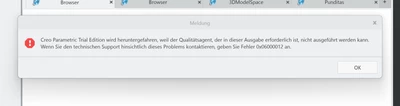
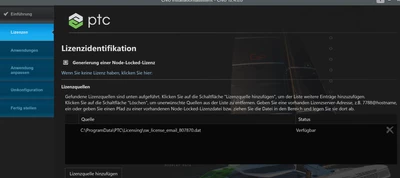
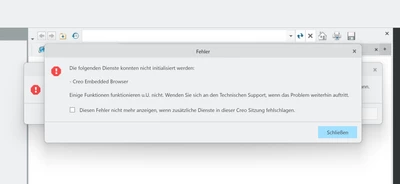
Hey everyone, I just signed up for the Student License, but unfortunately, the license file came without any information on how to proceed with it. I saved the file under Programme Data /PTC/Licensing, and added the license path in the setup wizard. But when I open Creo, only the free test version gets opened (which does not work either, because the embedded browser couldn't be initialized). 
I tried to use the product key of an old Creo version (4), but this does not work for Creo 12. Could anyone help out with the product key for the student license of Creo 12?
Thank you very much!
Best regards, Julian
JW_14443136_0-1766526872781.pngJW_14443136_1-1766526967567.png

JW_14443136_2-1766526995814.png


Best answer by JW_14443136

Edit: I resolved the issue by simply adapting the product key for Creo 10. 
Is it somehow possible to get an academic license? We usually don't use Creo at my university, that's why there is no admin I could ask. Unfortunately, in the student version are a few tools missing (simulate, generative design, ...) that are available in other CAD programmes student version.

1 reply

JW_1444313610-MarbleAuthorAnswer
10-Marble
December 23, 2025

Edit: I resolved the issue by simply adapting the product key for Creo 10. 
Is it somehow possible to get an academic license? We usually don't use Creo at my university, that's why there is no admin I could ask. Unfortunately, in the student version are a few tools missing (simulate, generative design, ...) that are available in other CAD programmes student version.