

1-Visitor
September 27, 2012
Solved

Trouble with manufacturing

  • September 27, 2012
  • 1 reply
  • 3271 views

Hi,

I'm trying to add a NC path to one of my models to allow it to be milled out of a bar by a CNC machine, but every time I go to start a NC manufacturing, or any sort of manufacturing for that matter in the Creo 2 student edition, I don’t get the manufacturing tab or any options. It thinks about it for a second then doesn’t do anything. I get no change from whatever screen I'm in. As a stopgap, I created a NC work piece over the top of the model in assembly, but I can’t get manufacturing to load or open to do anything else.

I feel like I’m missing something, pointers?
    Best answer by

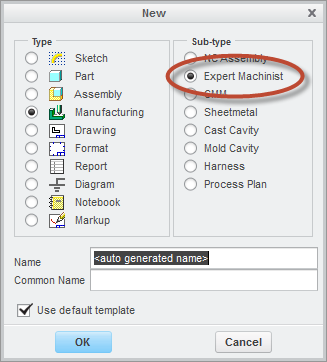
    The Student edition of Creo 2.0 provides access to CAM lite, 2.5 axis milling via Expert Machinist.

    For additional capabilites you would need to purchase an Academic edition.

    9-28-2012 12-15-57 PM.png

    1 reply

    Answer
    September 28, 2012

    The Student edition of Creo 2.0 provides access to CAM lite, 2.5 axis milling via Expert Machinist.

    For additional capabilites you would need to purchase an Academic edition.

    9-28-2012 12-15-57 PM.png

    1-Visitor
    September 29, 2012

    Cheers, I'll borrow the University’s copy to finish the model. I figured it would be something like this but couldn’t find the documentation to be sure.