
1-Visitor
March 12, 2022
Solved

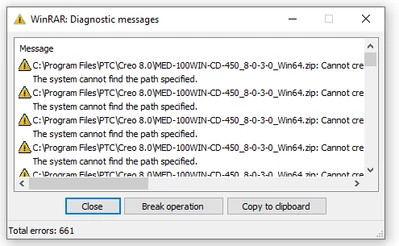
unable to extract files from creo 8.0
  • March 12, 2022
  • 2 replies
  • 1227 views

SK_9598379_0-1647091501229.png

This error is appearing when tried to extract files. what went wrong, please help

Best answer by MartinHanak

Hi,

1.] create C:\PTC directory

2.] copy MED-100WIN-CD-450_8-0-3-0_Win64.zip into C:\PTC directory

3.] select MED-100WIN-CD-450_8-0-3-0_Win64.zip, press right mouse button and use Open with > Windows Explorer

4.] select all items and press CTRL+C

5.] create C:\PTC\Creo8030 directory

6.] press CTRL+V


2 replies

24-Ruby III
March 12, 2022

 Hi,


What link did you use to download?

24-Ruby III
March 14, 2022

Hi,

1.] create C:\PTC directory

2.] copy MED-100WIN-CD-450_8-0-3-0_Win64.zip into C:\PTC directory

3.] select MED-100WIN-CD-450_8-0-3-0_Win64.zip, press right mouse button and use Open with > Windows Explorer

4.] select all items and press CTRL+C

5.] create C:\PTC\Creo8030 directory

6.] press CTRL+V