

4-Participant
April 7, 2025
Solved

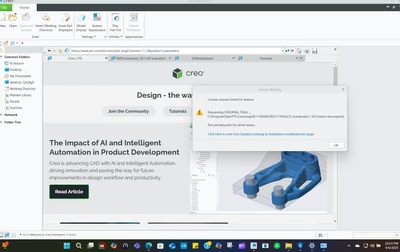
When I try to use Creo, I get the message Error -10

  • April 7, 2025
  • 1 reply
  • 485 views

Hi,


I have installed the PTC Creo late February.

Now, when I try to use it I get the message shown in the picture below:
 

BI_12885999_0-1743992816694.png

What is wrong?

I do not get it.

It looks like the PTC license has been cut.........


Any thoughts?


Thank you!

Best answer by MartinHanak

Hi,

in February you installed TRIAL version. TRIAL license is valid for couple of days, only.

If you are student then you can use Student license.

1.] uninstall TRIAL version of Creo

2.] install Creo using information included in following documents.

https://apps.ptc.com/schools/references/install_creo11_schools_standard.pdf

https://apps.ptc.com/schools/references/install_creo11_unistudent_standard.pdf


1 reply

24-Ruby III
April 7, 2025

Hi,

in February you installed TRIAL version. TRIAL license is valid for couple of days, only.

If you are student then you can use Student license.

1.] uninstall TRIAL version of Creo

2.] install Creo using information included in following documents.

https://apps.ptc.com/schools/references/install_creo11_schools_standard.pdf

https://apps.ptc.com/schools/references/install_creo11_unistudent_standard.pdf