12-Amethyst
July 3, 2024
Solved

Accessing support.ptc.com results in Bad Request error

  • July 3, 2024
  • 1 reply
  • 2350 views

Every while, when trying to access support.ptc.com it results in a

Bad Request

Your browser sent a request that this server could not understand.

.

This happens just before signing in.

In the console I see this error:

GET https://support.ptc.com/appserver/common/login/ssl/login.jsp?dest=%2Fappserver%2Fcs%2Fportal%2F&msg=1 400 (Bad Request)


What can I do?

Best answer by rhawa

The only known two Work arounds are, either to start an incognito Browser Session and open support.ptc.com from there or to delete local cached data and cookies.

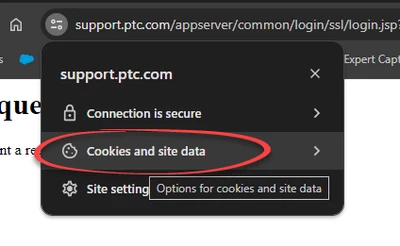
For the second, you may delete all the stored data of all web sites or selectively just for support.ptc.com (described for Chrome Browser):

  • Next to the URL, click on "View on site information" rhawa_0-1720006039539.png
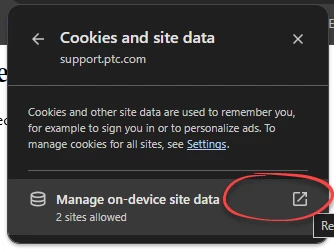
  • Then select "Cookies and site data"
    rhawa_1-1720006092614.png
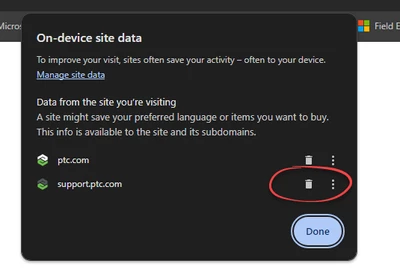
  • Then "Manage on-device site data"


    rhawa_2-1720006164115.png
  • Delete the data just for support.ptc.com
    rhawa_3-1720006210807.png

Hope this helps for anybody having the same issue.

1 reply

rhawa12-AmethystAuthorAnswer
12-Amethyst
July 3, 2024

The only known two Work arounds are, either to start an incognito Browser Session and open support.ptc.com from there or to delete local cached data and cookies.

For the second, you may delete all the stored data of all web sites or selectively just for support.ptc.com (described for Chrome Browser):

  • Next to the URL, click on "View on site information" rhawa_0-1720006039539.png
  • Then select "Cookies and site data"
    rhawa_1-1720006092614.png
  • Then "Manage on-device site data"


    rhawa_2-1720006164115.png
  • Delete the data just for support.ptc.com
    rhawa_3-1720006210807.png

Hope this helps for anybody having the same issue.

17-Peridot
July 4, 2024

Hi @rhawa , 

Yes, this issue affects just PTC employees, in particular those who test different eSupport systems, owing to the volume and length of the cookies set by PTC's internal networking appliances.

Clearing the cache and deleting cookies for the ptc.com domain from time to time helps keep these issues to in check.

We're pursuing options with our suppliers to address this issue.

Peter.