

23-Emerald IV
April 5, 2021
Solved

Case Logger File Attachment Timestamp Issue

  • April 5, 2021
  • 3 replies
  • 4168 views

Files attached when creating a new case are being stamped with the wrong time.  I created a case 45 minutes ago and attached thee files at the same time.  Those files are all stamped with a future time that hasn't occurred yet and this is messing up the sort order with the rest of the case activity.  These three attachments should be at the bottom of the page since they are actually the first activity.  It seems that UTC times are being displayed but then called EDT, which they are not.
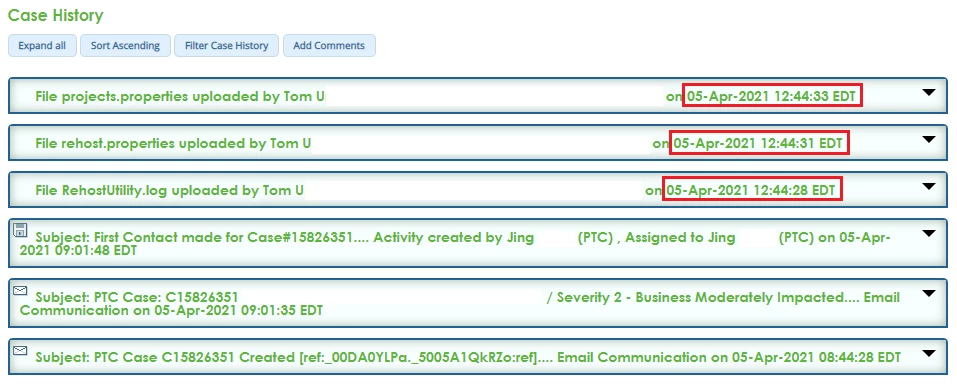
 

Case Logger - File Attachement Dates.png

Best answer by PeterCase

Hi @TomU , 

The team is aiming to have this fixed this coming Thursday (15th Apr). As you've seen, we've switched over to a different file attachment mechanism offered by our CRM vendor. One unseen issue in our QA was a difference in timestamp format when we switched over. Another issue with multi-byte filenames was also discovered and this will be resolved at the same time.

All fixes will be retroactive (i.e. the timestamps will be corrected on your cases).

Sorry for the inconvenience caused here, and thanks for reporting this problem. 

Peter.

3 replies

TomU23-Emerald IVAuthor
23-Emerald IV
April 5, 2021

By the way, this is affecting *ALL* file attachments, even those included in email replies (like images.)

TomU23-Emerald IVAuthor
23-Emerald IV
April 5, 2021

Looks like the sorting issue is more significant than just the four hour time difference between UTC and EDT.  Even on old cases the file attachments are now sorted completely out of order with their associated email.


TomU_0-1617643369973.png


5-Regular Member
April 7, 2021

Hi @TomU,

Thanks for bringing this to our attention.  I raised this with the team yesterday and they are looking into it.  More to follow!

Best

Leigh

TomU23-Emerald IVAuthor
23-Emerald IV
April 8, 2021

If it helps, I just received this response from one of the tech support engineers.  They are also having trouble with case attachments.  (Edited slightly for clarity.)


Somehow I couldn’t find any attachment files you sent via the case.  Internally we are using salesforce to track and document cases.  We switched to using Salesforce Lightning view instead of its Classic view a while back.  It works fine but it might run into issues with attachments with Lightening view because I cannot see any attachment in the cases with Lightening view anymore. I’m able to see & get all those attachments in this case after switching back to the old Classic view .


I was puzzled that you mentioned that you sent the files to us twice but I couldn’t see any of them.   Now I see why.


5-Regular Member
April 9, 2021

Thanks @TomU.

I have updated the team with this feedback.

Best

Leigh

PeterCaseCommunity ManagerAnswer
Community Manager
April 13, 2021

Hi @TomU , 

The team is aiming to have this fixed this coming Thursday (15th Apr). As you've seen, we've switched over to a different file attachment mechanism offered by our CRM vendor. One unseen issue in our QA was a difference in timestamp format when we switched over. Another issue with multi-byte filenames was also discovered and this will be resolved at the same time.

All fixes will be retroactive (i.e. the timestamps will be corrected on your cases).

Sorry for the inconvenience caused here, and thanks for reporting this problem. 

Peter.