TomU
23-Emerald IV
Aug 31, 2017 1:01 AM UTC
Question

FTP Upload To Support Cases Not Working

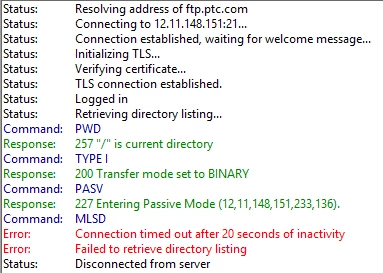
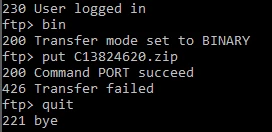
The last several times I have tried to upload data via FTP to a tech support case, it hasn't worked.  I am following the instructions in CS156868.  I'd open a case for this upload issue, but apparently I'm not allowed to open cases for "Electronic Services".  Here are some screenshots showing the problem.


From the command prompt:
ftp.PNG


From FileZilla:

filezilla.PNG


Is anyone else having this problem?

6 replies

Community Manager
Sep 12, 2017 4:12 PM UTC

Hi Tom, do you see the same issue when you log in as the "cs" user ?  See CS98949 for details.

CS156868 looks like a duplicate / outdated article which I'll ask the Integrity team to pull.

Translate
TomU
TomU23-Emerald IVAuthor
23-Emerald IV
Sep 12, 2017 5:02 PM UTC

Yes.  That is the only credentials I've ever tried (per the article.)

Translate
Community Manager
Sep 13, 2017 10:13 AM UTC

Hi Tom,

Could you please send me the full interaction details (by email if anything sensitive) ?

What I'd expect to see is a "Notes" section straight after your 230 - User logged in message. Here is the full transcript for me:


Filezilla_13_Sept_2017.png


I trried this both on the PTC network and at home and the upload is a success. The engineer sees the attachment in the case:


Upload_Confirmed_13_Sept.png


Many thanks,

Peter.

Translate
16-Pearl
Dec 4, 2017 8:46 PM UTC

Hello @TomU,


I believe you missed a step.  Between logging in and uploading the file, the instructions indicate that you must cd incoming.  If I fail to perform that step, I get the same problem you had, with both FileZilla and CLI ftp.  In FileZilla, you can modify the FileZilla Site Manager entry for login via Anonymous by going to the Advanced tab, and changing the remote directory default to /incoming.


There is an additional problem with FileZilla, which requires passive mode to be set with in order to be able to login to our site.  This can be done under the Transfer Settings tab of the Site Manager entry for the Anonymous login.  Alternatively, you can use a different FTP client, such as WinSCP, which did not require additional configuration changes to connect to ftp.ptc.com.


Kind Regards,

Kael Lizak

Senior Technical Support Engineer

Integrity Lifecycle Manager

PTC


Translate
TomU
TomU23-Emerald IVAuthor
23-Emerald IV
Dec 11, 2017 1:42 PM UTC

KaelLizak wrote:

In FileZilla, you can modify the FileZilla Site Manager entry ... by going to the Advanced tab, and changing the remote directory default to /incoming.


There is an additional problem with FileZilla, which requires passive mode to be set with in order to be able to login to our site.  This can be done under the Transfer Settings tab of the Site Manager entry...

@KaelLizak, It would be a good idea to update CS98949 with this information.  Without performing these extra steps, the instructions listed in the article don't work.  Thanks.

Translate