5-Regular Member
July 2, 2024
Solved

I cannot open "Manage My Web Account" in esupport page.

  • July 2, 2024
  • 1 reply
  • 3818 views

I cannot open "Manage My Web Account" in esupport page and return to esupport main page.


How can i fix ?

 

Best answer by PeterCase

Hi @谷真_9996713 , 

Thanks for getting back to us. Indeed, we are now able to reproducible this issue and our team is working on a fix. We'll communicate timelines shortly.

To work around your immediate problem, setting your eSupport language to English should allow you to navigate cleanly to the Web Account Management and other pages.

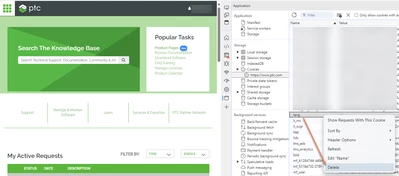
In case you experience any "stickiness", you can also delete the "lang" cookie and refresh, and the redirect should work: 

PeterCase_0-1719907166105.png

Thank you, 

Peter.


1 reply

Community Manager
July 2, 2024

Hi @谷真_9996713 , 

We checked and don't find any issue with this page, also when viewing your web account. 

Please could you try some basic troubleshooting first, and let us know if this resolves the problem: 

1) Clear browser cache, restart your session and access PTC.com Account Management

2) Try the same on an alternative browser 

3) If there's still a problem, open your browser Developer Tools and check for errors in the Network tab and Console  

Please let us know if any of the above help you solve this issue.

Thank you, 

Peter. 

5-Regular Member
July 2, 2024

Hi Peter-san,


Thank you for your reply and advice.


I cleared the cache and tried connecting, but the behavior did not change.


When I accessed it just now, the following message was displayed: It may not be a global issue, but rather a problem with the Japanese version of the webpage.

 eSupportポータル日本語版で英語ページリダイレクト不具合が発生しております。 英語版に切り替えてご利用ください。

->There is an issue with the English page redirect on the Japanese version of the eSupport portal. Please switch to the English version.


Thank you.

Taniguchi

PeterCaseCommunity ManagerAnswer
Community Manager
July 2, 2024

Hi @谷真_9996713 , 

Thanks for getting back to us. Indeed, we are now able to reproducible this issue and our team is working on a fix. We'll communicate timelines shortly.

To work around your immediate problem, setting your eSupport language to English should allow you to navigate cleanly to the Web Account Management and other pages.

In case you experience any "stickiness", you can also delete the "lang" cookie and refresh, and the redirect should work: 

PeterCase_0-1719907166105.png

Thank you, 

Peter.