1-Visitor
January 18, 2021
Solved

Open a Support Case Ui is broken (Edge DEV)

  • January 18, 2021
  • 3 replies
  • 6742 views

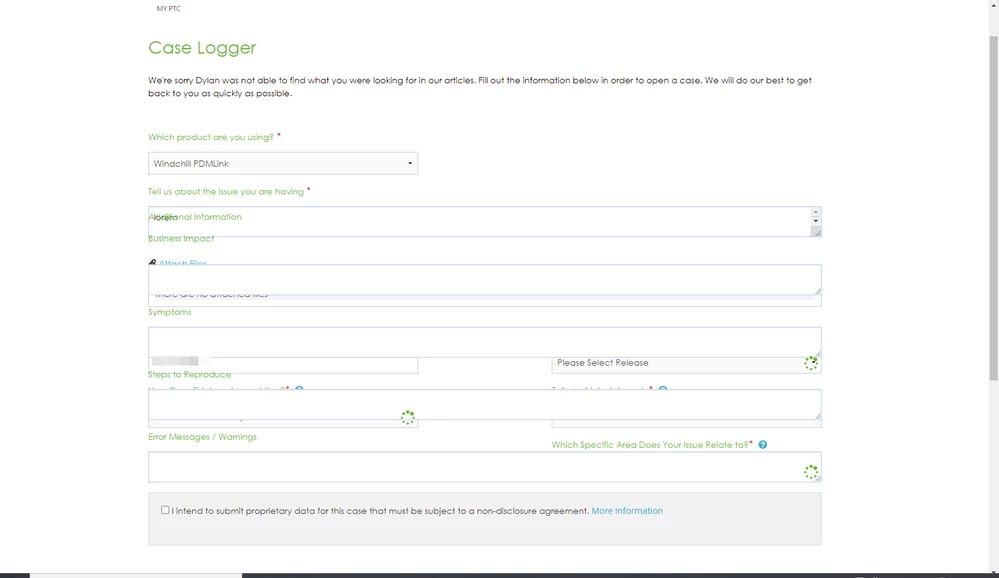
I cannot open new Support Case

20210119_095742_3.png

The UI is broken.

Tested on Chrome and Edge.

In the case of Edge, no Extensions where running at the moment.

Best answer by PeterCase

Hi @jgoncalves ,

Thanks for confirming. We see the same here on Edge Dev 89.0.760.0 and it does appear to be a compatibility issue with the HTML / CSS on the forms in the Support Assistant. As Microsoft mentions here, the Beta version they release every 6 weeks is more stable. Testing on Edge Beta 88.0.705.45 the issue is not reproducible any more.

With regard to our eSupport tools, testing happens on latest production versions of mainstream browsers (IE / Edge / Firefox / Chrome). Knowing that this could become an issue in a few months for us is helpful and the dev team has been made aware.

Best regards,

Peter.

3 replies

Community Manager
January 18, 2021

Hi @jgoncalves ,

Thanks for reporting this issue to us. One of our production nodes had a brief outage earlier today and the symptoms you're describing look to be consistent with CSS not loading correctly.

All production nodes are currently UP, and so a hard refresh with Ctrl + F5 should restore functionality.

Please could you check and let us know if you are still seeing an issue ?

With best regards,

Peter.

1-Visitor
January 18, 2021

Ctrl+F5 or Clearing the browser cache(from Edge menu) is not fixing the issue.

1-Visitor
January 18, 2021

I've done more tests:

  • IE (Windows 10 20H2) is working
  • Microsoft Edge Version 87.0.664.75 (Official build) (64-bit) is working
  • Microsoft Edge (DEV) Version 89.0.760.0 (Official build) dev (64-bit) is not working

Image was captured from Edge Dev. It is my main browser. Don't know if is problem of Edge or PTC Site.


PeterCaseCommunity ManagerAnswer
Community Manager
January 18, 2021

Hi @jgoncalves ,

Thanks for confirming. We see the same here on Edge Dev 89.0.760.0 and it does appear to be a compatibility issue with the HTML / CSS on the forms in the Support Assistant. As Microsoft mentions here, the Beta version they release every 6 weeks is more stable. Testing on Edge Beta 88.0.705.45 the issue is not reproducible any more.

With regard to our eSupport tools, testing happens on latest production versions of mainstream browsers (IE / Edge / Firefox / Chrome). Knowing that this could become an issue in a few months for us is helpful and the dev team has been made aware.

Best regards,

Peter.

1-Visitor
February 12, 2021

I found the same today with Edge 88.0.705.63 (Official build) (64-bit) and with Chrome 88.0.705.63 (Official build) (64-bit) and with Internet Explorer from Windows 10 v1909.

It is impossible to raise a support request from any of those browsers.  I suppose it's one way of keeping your work volume under control...

1-Visitor
February 12, 2021

I just tested my environment with 

  • Version 88.0.705.63 (Official build) (64-bit)
  • Version 88.0.705.68 (Official build) (64-bit)

With both standard releases (no DEV/Canary/Beta) it worked just fine. ✔


Did you tried to disable all Edge extensions?


FYI, Edge Version 90.0.789.1 (Official build) dev (64-bit) continues to fail

 
12-Amethyst
March 4, 2021

Same issue here in both Chrome 89 and Edge 89.

I opened a case to tech support, but they referred me to this community thread.