
21-Topaz I
Jul 15, 2019 1:19 PM UTC
Question

Script Error from PTC's Start Page

Last week my users starting getting this script error when they start Creo.  Is that something PTC needs to fix?  I know I can add the config option web_browser_homepage or js_error_policy but I don't think that should be the solution.  Isn't this something on PTC's site?
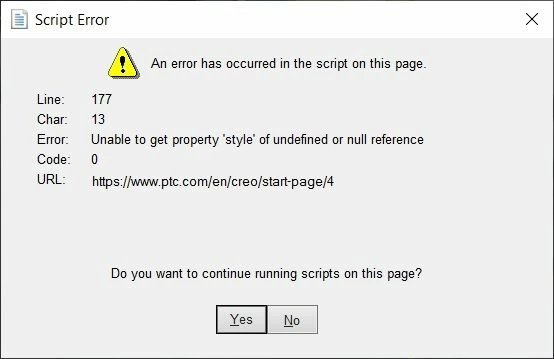
script_error.jpg

12 replies

4-Participant
Jul 15, 2019 8:42 PM UTC

We started getting the same error messages.  We have no idea.  We assume this is a PTC issue or some kind of Windows update problem.  I wish PTC would respond.

Translate
Dale_Rosema
23-Emerald IV
Jul 16, 2019 11:52 AM UTC

Out yesterday. Logged in today and got the same message.

Translate
STEVEG21-Topaz IAuthor
21-Topaz I
Jul 16, 2019 12:15 PM UTC

Ok PTC.  Any comment?

Translate
4-Participant
Jul 16, 2019 12:19 PM UTC
I put in a case log. PTC support gave me a CS# to look at. What a joke. This CSArticle - CS67489 is from 2012. I am using IE 11. This has nothing to do with the current errors.
Translate
4-Participant
Jul 16, 2019 12:32 PM UTC
Just add the following to your config.pro. I am using IE 11. The js errors don't show anymore...good or bad. Set config.pro option js_error_policy to suppress_continue
Translate
STEVEG21-Topaz IAuthor
21-Topaz I
Jul 16, 2019 12:58 PM UTC

Why did this get moved to the Assembly area?  This has to do with eSupport Help webpage on PTC's site.  Something changed on the site to make that dialog display.

Translate
15-Moonstone
Jul 16, 2019 1:33 PM UTC

We have had these for years. It appears to be something with the registry settings tied to the browser as tied to xtop.exe.

Internet Explorer 11.0 clients: Add the following registry keys with values of 11000 (decimal) or 2af8 (hex) via regedit or other method

​Windows Registry Editor Version 5.00

[HKEY_LOCAL_MACHINE\SOFTWARE\Microsoft\Internet Explorer\MAIN\FeatureControl\FEATURE_BROWSER_EMULATION]
"xtop.exe"=dword:00002af8
"ptc_ie_server.exe"=dword:00002af8
"creoagent.exe"=dword:00002af8
"uwgm_client.exe"=dword:00002af8
"genlwsc.exe"=dword:00002af8

[HKEY_CURRENT_USER\SOFTWARE\Microsoft\Internet Explorer\MAIN\FeatureControl\FEATURE_BROWSER_EMULATION]
"xtop.exe"=dword:00002af8
"ptc_ie_server.exe"=dword:00002af8
"creoagent.exe"=dword:00002af8
"uwgm_client.exe"=dword:00002af8
"genlwsc.exe"=dword:00002af8


Article - CS23522

Translate
STEVEG21-Topaz IAuthor
21-Topaz I
Jul 16, 2019 9:09 PM UTC

This just started happening to my users and as you can see to other companies recently.  Why would it be on our end and not PTC's?

Translate
15-Moonstone
Jul 16, 2019 10:22 PM UTC

I know in our case it was because of some Windows policies that our IT had pushed out. This has been around for quite some time if you look at the case I linked you can see that it has been around as an issue for some people as far back as 2011 when the case was first crated with IE8 and has been updated right up to this past May to keep up with the browsers. There's nothing basically wrong with the PTC site in question and you can see that by opening the URL in a standalone browser. 

Translate