

6-Contributor
February 17, 2021
Question

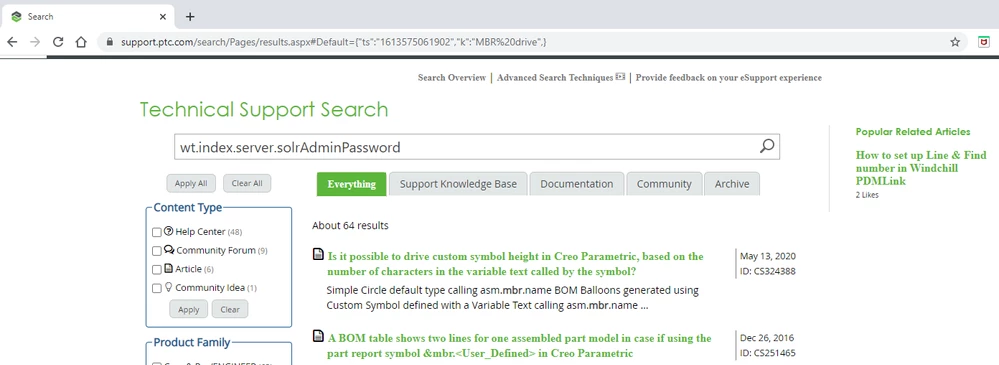
Technical Support Search field showing wrong search text.

  • February 17, 2021
  • 1 reply
  • 4954 views

For the last several weeks, the PTC Technical Support Search has been replacing my current search term with an older search term.  This is repeatable across multiple browsers (Firefox, Chrome) regardless of whether I delete my complete internet history or part of the cached settings.


In the image below, I searched for the text "MBR drive". You can see that as soon as the results page displays, the website replaces "MBR drive" with "wt.index.server.solrAdminPassword", a search I ran about a month ago.


How do I get the PTC website to retain and display the current search term?
 

SearchFieldMemoryIssue.png

1 reply

Community Manager
February 17, 2021

Hi @MidwestMark

Thanks for reaching out on this. We're trying to understand the circumstances in which a "Default" URL parameter would be added. Are you accessing the search from a specific link, or bookmark ? Do you reproduce the issue if you access from https://support.ptc.com/search/Pages/results.aspx ?

Peter.

6-Contributor
February 17, 2021

Clicking the link in you message automatically populates the search field with "wt.index.server.solrAdminPassword".


I usually start at https://www.ptc.com/en/support. The field displays properly there until I enter something new and click the search icon. Interestingly, the issue is not currently appearing in Edge, but I only use that browser as a last resort.

Community Manager
February 17, 2021

Thanks for the additional details. It's strange as we do not save anything from session to session. Your search should appear empty. No keywords, no filters, just the rolling search suggestion text which disappears when mouse focus lands in the search box. We made a few updates on our search platform on the weekend of Feb 6/7, so it's possible something has regressed on one or more of the nodes in the cluster (hence the behavior on Edge). I've opened an incident with the Search developers to investigate and address this, and will share an update once we're done.