3-Newcomer
February 16, 2026
Solved

Dimension leader lines /spacing & cleanup

  • February 16, 2026
  • 1 reply
  • 86 views

Hello- my question is with dimensioning


When adding a model driven dimension sometimes the leader lines touch the part.

Is there a quick way to clean these up instead of dragging the drag button over? 

Or is there a setting to have a certain space be the standard on the drawings?


Please advise.


Thank You,

George Dominguez

george.dominguez@roberthsaw.com
Best answer by Oobee

Hi!

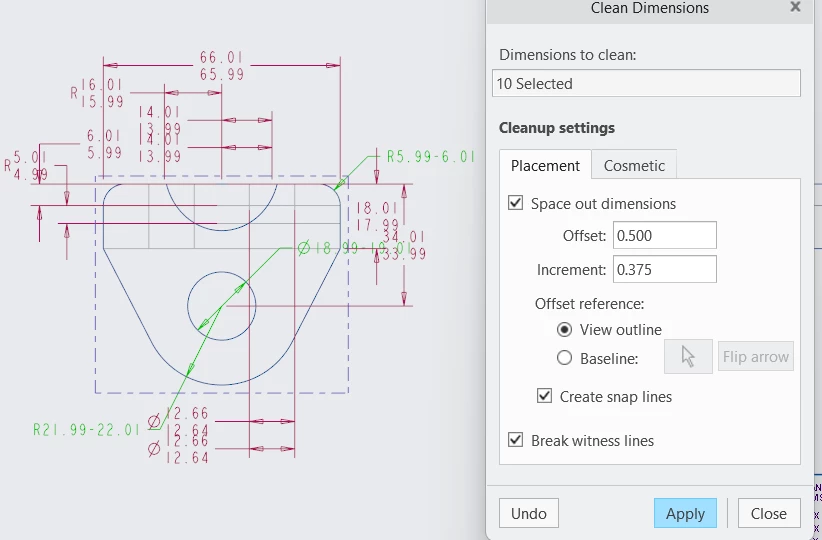
You can try a couple things, I find that selecting my dimensions and clicking Cleanup Dimension (right-click and hold after selecting the dimensions) is a decently fast way to space things out with consistency. It doesn't apply to angular or radial dimensions, but it does make a good first pass. Certain things might still need to be adjusted like witness lines.
 Cleanup DimensionsCleanup Dimensions

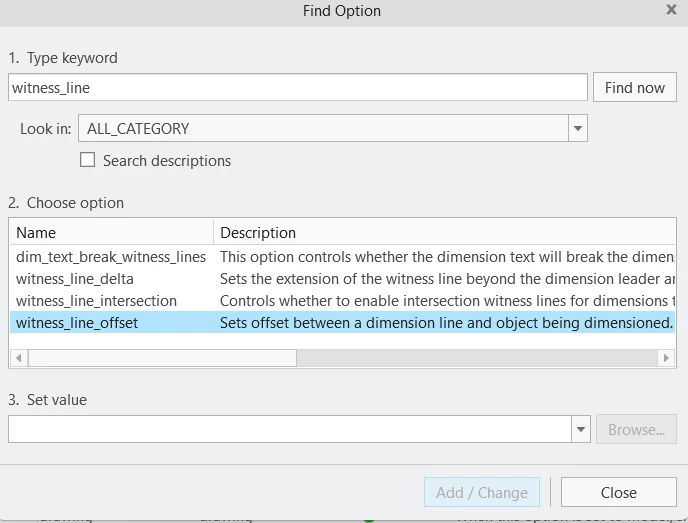
You can control witness line offset globally with the detail option 'witness_line_offset'
Screenshot 2026-02-16 124236.png
Hope that helps!

1 reply

Oobee12-AmethystAnswer
12-Amethyst
February 16, 2026

Hi!

You can try a couple things, I find that selecting my dimensions and clicking Cleanup Dimension (right-click and hold after selecting the dimensions) is a decently fast way to space things out with consistency. It doesn't apply to angular or radial dimensions, but it does make a good first pass. Certain things might still need to be adjusted like witness lines.
 Cleanup DimensionsCleanup Dimensions

You can control witness line offset globally with the detail option 'witness_line_offset'
Screenshot 2026-02-16 124236.png
Hope that helps!

3-Newcomer
February 16, 2026

thank you very much for this information. it will help tremendously.