
1-Visitor
July 20, 2017
Solved

Copied Group operation

  • July 20, 2017
  • 2 replies
  • 6634 views

I was going through a tutorial provided by the Creo help site and there was a file of a cranck shaft. When I checked it's Model tree I saw Group of some features were copied to a distance and about an angel. How it is done in creo please tell me about it. I am attaching the file....
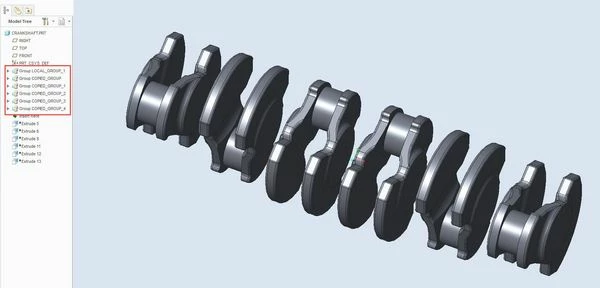


Capture.JPG

Best answer by psobejko

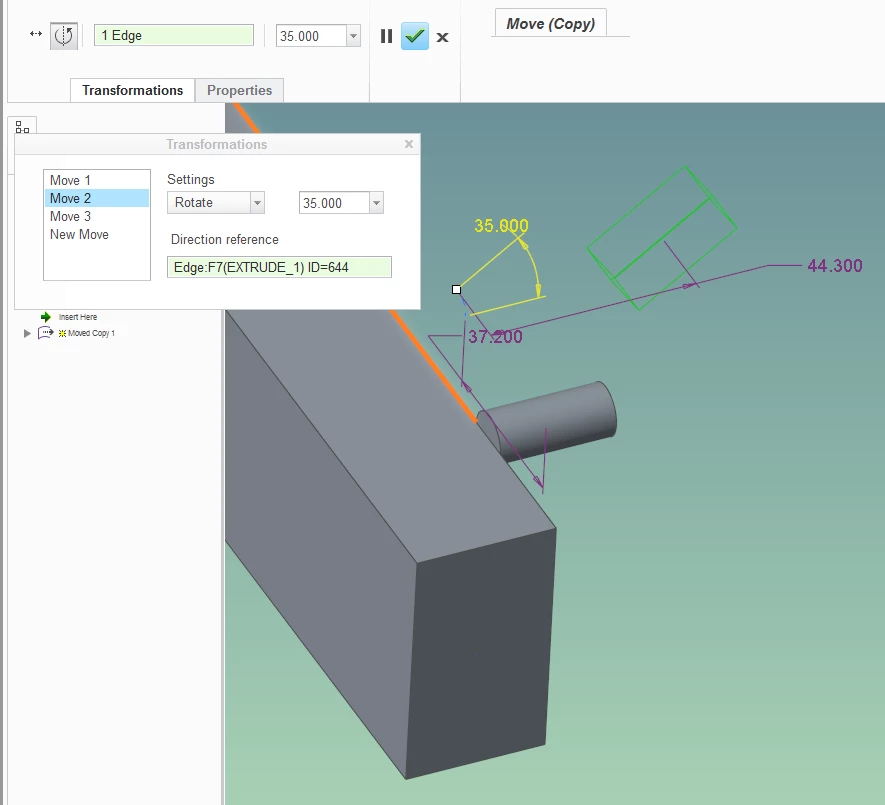
Actually, you can add any number of moves / rotates to the copy.  See the Transformations tab...

move_copy_paste.png


2 replies

1-Visitor
July 20, 2017

1) Select the feature(s)

2) Model Tab - > Operations group -> Copy (or CTRL+C)

3) Model Tab - > Operations group -> Paste -> Paste Special -> Check the "Apply move/rotate transformations to copies"


1-Visitor
July 20, 2017

Thanks for reply. But in the file you can see the copied feaures are moved and rotated as well, both option can not be saved in paste special command.

psobejko1-VisitorAnswer
1-Visitor
July 20, 2017

Actually, you can add any number of moves / rotates to the copy.  See the Transformations tab...

move_copy_paste.png


23-Emerald III
July 20, 2017

In the assy, go to COMPONENT drop down arrow, COMPONENT OPERATIONS, TRANSFORM.