1-Visitor
January 24, 2017
Solved

How to create a epicycloidal sketch in CREO 2.0?

  • January 24, 2017
  • 2 replies
  • 2800 views

I've seen tutorials for creating cycloidal or epicycloidal using SolidWorks & Blender. Can anyone tell me where to find a tutorial or instructions on how to do this with CREO 2.0?

Best answer by psobejko

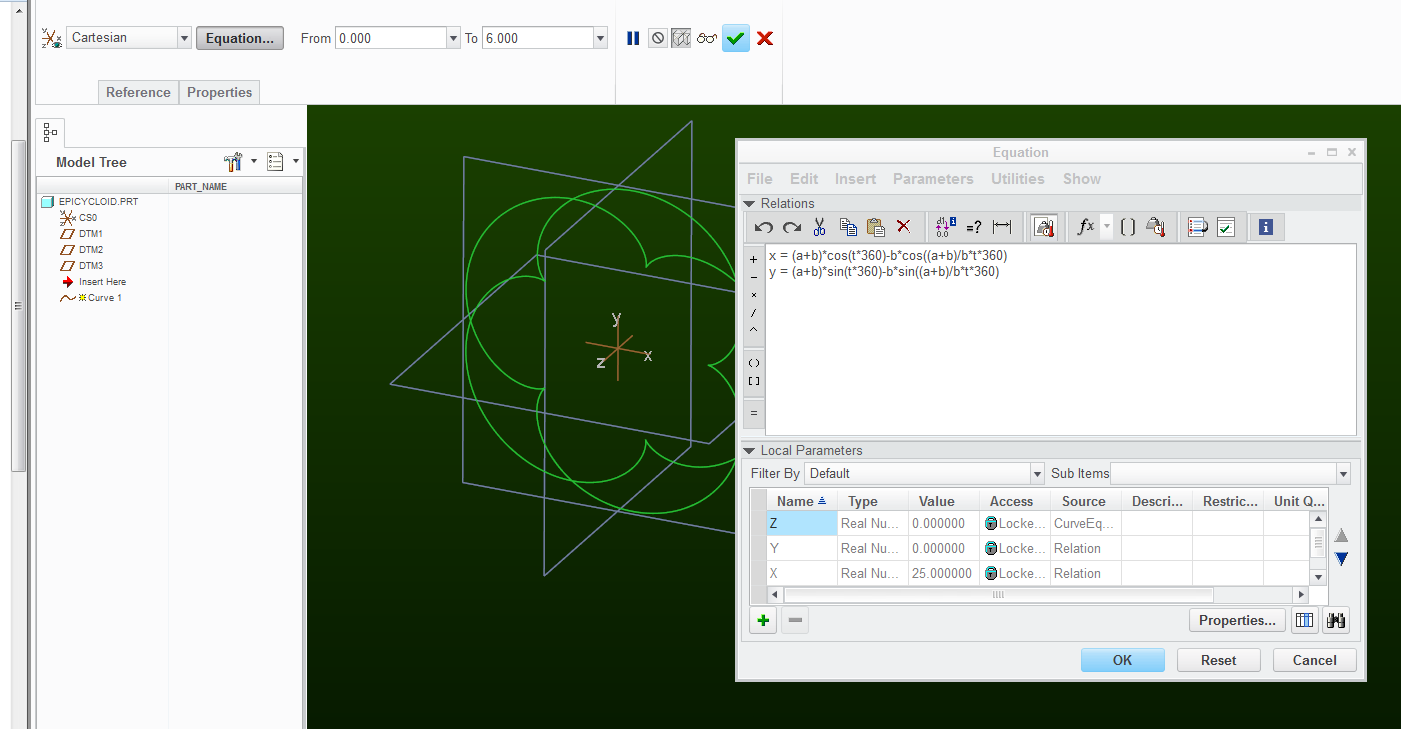
I'd use the curve by equation feature.  Then you can trace the curve entities in your sketch...

Equations for Curves (and more)

Or this one: http://mathworld.wolfram.com/Epicycloid.html

Here's an example in Creo 2.0:

epicycloid.png

2 replies

psobejko1-VisitorAnswer
1-Visitor
January 24, 2017

I'd use the curve by equation feature.  Then you can trace the curve entities in your sketch...

Equations for Curves (and more)

Or this one: http://mathworld.wolfram.com/Epicycloid.html

Here's an example in Creo 2.0:

epicycloid.png

1-Visitor
January 25, 2017

You'll probably also want to construct one lobe and pattern if you're looking to create a solid. You may also need to adjust the angle used in the equations.