



(2nd try) CREO 7 dont saving last config and working_directory used II
i already did a topic about this, but im still have the same problems
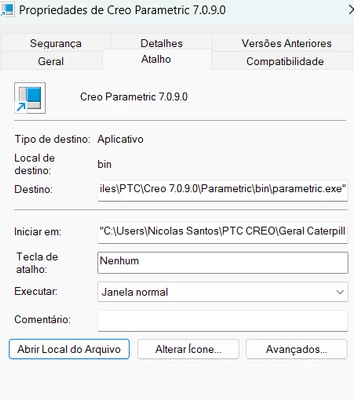
the path only works on the first try after i change it. But on the 2nd inicialization doesnt work anymore, i dont know what to do anymore.
maybe its something in my config
search_path_file $CREO_COMMON_FILES\ifx\parts\prolibrary\search.pro
template_new_ecadasm $PRO_DIRECTORY\templates\inlbs_ecad_asm.asm
template_boardpart $PRO_DIRECTORY\templates\inlbs_ecad_board.prt
search_path_file $CREO_COMMON_FILES\afx\parts\prolibrary\search.pro
drawing_setup_file C:\Users\Nicolas Santos\PTC CREO\Geral Caterpillar\(Loc)Start_files\Active Drawing_REV.dtl
format_setup_file C:\Users\Nicolas Santos\PTC CREO\Geral Caterpillar\Folhas\mfgtb-c.frm
mdl_tree_cfg_file C:\Users\Nicolas Santos\PTC CREO\Geral Caterpillar\(Loc)Start_files\tree.cfg
pro_font_dir C:\Users\Nicolas Santos\PTC CREO\Geral Caterpillar\(Loc)Start_files
pro_material_dir C:\Users\Nicolas Santos\PTC CREO\Geral Caterpillar\Biblioteca_elementos\Materials
pro_plot_config_dir C:\Users\Nicolas Santos\PTC CREO\Geral Caterpillar
pro_symbol_dir C:\Users\Nicolas Santos\PTC CREO\Geral Caterpillar\Símbolos
pro_format_dir C:\Users\Nicolas Santos\PTC CREO\Geral Caterpillar\Folhas
template_designasm C:\Users\Nicolas Santos\PTC CREO\Geral Caterpillar\(Loc)Start_files\start_tool_assy_new.asm.3
template_sheetmetalpart C:\Users\Nicolas Santos\PTC CREO\Geral Caterpillar\(Loc)Start_files\start_tool_new.prt.4
template_solidpart C:\Users\Nicolas Santos\PTC CREO\Geral Caterpillar\(Loc)Start_files\start_tool_new.prt.4
trail_dir C:\Users\Nicolas Santos\PTC CREO\Geral Caterpillar\(Loc)Start_files\TRAIL
system_colors_file C:\Users\Nicolas Santos\PTC CREO\Geral Caterpillar\(Loc)Start_files\syscol.scl
browser_favorite C:\Workspace\
model_detail_options_file C:\Users\Nicolas Santos\PTC CREO\Geral Caterpillar\(Loc)Start_files\Active Drawing_REV.dtl
pen_table_file C:\Users\Nicolas Santos\PTC CREO\Geral Caterpillar\(Loc)Start_files\Active Drawing_REV.dtl
start_model_dir working_directory
file_open_default_folder working_directory
!global_appearance_file C:\PTC\JactoUtils\appearance.dmt
!pro_colormap_path C:\ptc\Geral Caterpillar\(Loc)Start_files
!hole_parameter_file_path C:\PTC\JactoUtils\HoleChart
!pro_dtl_setup_dir C:\ptc\Geral Caterpillar\(Loc)Start_files
!template_drawing C:\ptc\Geral Caterpillar\(Loc)Start_files\mfgtb-c.frm.1
(the same config was used to work with jacto and now the lines i dont know how to change, i put as comentary)