
1-Visitor
March 15, 2017
Solved

Analysis done but "run status" is empty

  • March 15, 2017
  • 2 replies
  • 3580 views

Hello,

I created a non-linear analysis, it runs but when I would like to check on the window "Run Status" is empty.

I have the same issue when the analysis is done, the "Run Status" is always empty and it's impossible to see results like any results exist.
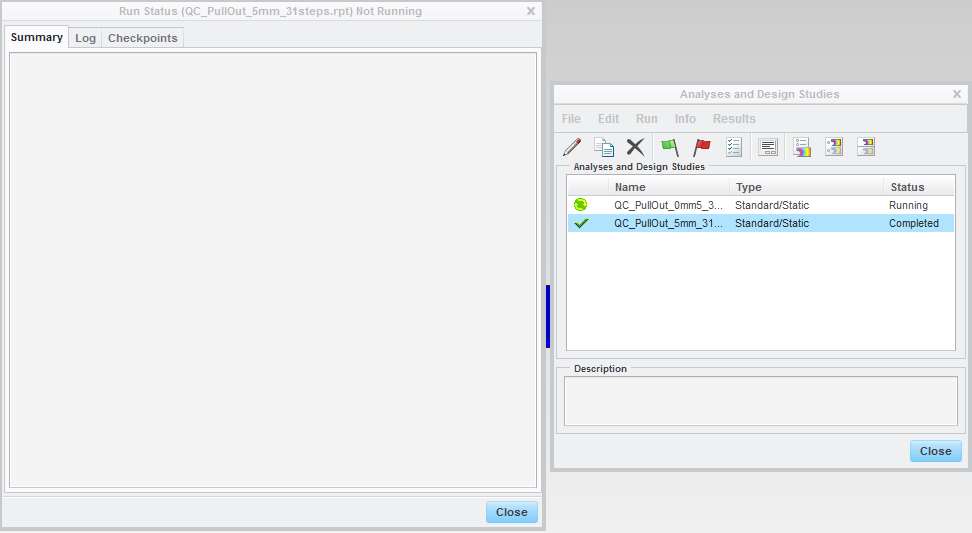
Analysis done.jpg

I checked my configuration: interfaces, materials, mesh, constraints but I don't understand why it doesn't work and why I don't have any error messages.

Do you have ideas of possible mistakes?

Thank you in advance for your help.

Unfortunately, it's impossible to share the study.

Best answer by Domen_130833

Create the same analysis in the folder C:\temp and check the Summary tab again.

In my experience this sort of problem usually occurs, because of some non ascii characters used in the path of the working directory.

2 replies

13-Aquamarine
March 15, 2017

Are your working directory, and directory for output files in the analysis settings, the same?

mbernachy1-VisitorAuthor
1-Visitor
March 15, 2017

Yes, it's the same.

13-Aquamarine
March 15, 2017

If you navigate to that folder, is there an analysis folder there?  Is there an .rpt file in the analysis folder?  If you open the .rpt in Notepad, what does it contain?

15-Moonstone
March 17, 2017

Create the same analysis in the folder C:\temp and check the Summary tab again.

In my experience this sort of problem usually occurs, because of some non ascii characters used in the path of the working directory.

mbernachy1-VisitorAuthor
1-Visitor
March 20, 2017

It was due to an accent in the name of the folder. I change the name and it works.

Thank you for your answer Domen Resnik !