

Appearance library - automatic bump, color texture and decal "load"
Hello all,
this question is about automatic "load" of bump, texture and decal when appearance is applied. l made a order in my appearances library and AFTERWARDS l discovered that, there is some system in appearances and relevant bump, color texture and decals. Because my stopped work after renaming and global_appearance_file config change.
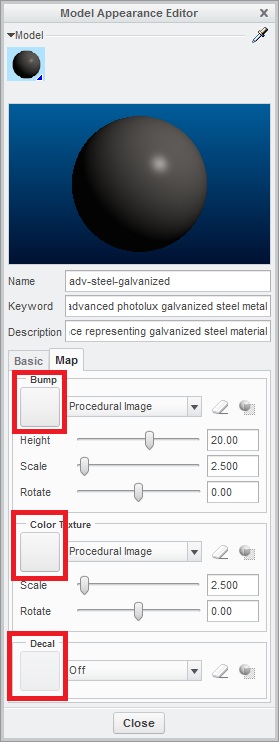
QUESTION: What system does it wotk?
IDEA 1: "File name system"
- files with little different names --- all saved in one directory (global_appearance_file)
- color name - adv_steel_galvanized
- bump name - adv_steel_galvanized_bump
- texture name - adv_steel_galvanized_texture
- decal_name - adv_steel_galvanized_decal
IDEA 2: "Hard save when it´s done"
- create an appearance and apply bump, texture or decal.
- than save it (don´t care about files name ---> appearnce adv_steel_galvanized include a bumb with file name scratch)
IDEA 3: "Other solution"
- do you have any other praxis or idea ?
I hope here is many render profi guys and somebody can help.
This question is targeted to Vladimir Palfy a big fan of renders and unofficial PTC community render guru... best regards 
Thanks for any ideas
This thread is inactive and closed by the PTC Community Management Team. If you would like to provide a reply and re-open this thread, please notify the moderator and reference the thread. You may also use "Start a topic" button to ask a new question. Please be sure to include what version of the PTC product you are using so another community member knowledgeable about your version may be able to assist.