1-Visitor
March 15, 2013
Question

Application configuration file open error

  • March 15, 2013
  • 2 replies
  • 11517 views

Hi all.what causes this error and how it can be removed.i get this error when i want to load Cro Parametric.
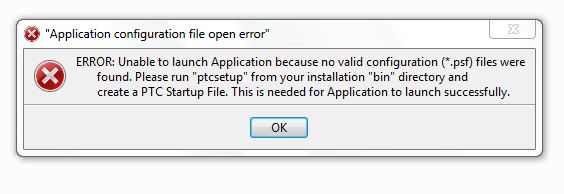

starting+problem.JPG

    2 replies

    17-Peridot
    March 16, 2013

    I suspect your startup shortcut if incorrect. Do you still have the default Creo startup shortcut and does this function? Has anyone changed folder names or locations for the Creo install? Do you have multiple Creo installations? Is the path pointing to non-existing "earlier" installation?

    I will suggest you start a case with PTC to confirm the install if you still have maintenance.

    DavidKhan1-VisitorAuthor
    1-Visitor
    March 16, 2013

    yea it is the shortcut.

    it is not functioning.

    No one has changed the forlder names.

    yes i have installed creo 1 but that has a separate folder in a separate drive.i have uninstalled that but still a problem.

    The path doesnot point so.

    17-Peridot
    March 16, 2013

    Are you installing any additional extensions? Have you tried to install to the default folder?

    I know this is frustrating and it really should be a simple thing. I can tell you, although it will not help, that every installation has worked as long as I follow some basic steps: Uninstall completely; download the install program and help files (6+gb!) and extract them to an install folder in the root; create a Creo program folder; drag and drop the license file when prompted during install; step through the pages to include Mechanism extension (the default included version); provide my custom install path; install... and install the help files the same way. I test this with using the default icon on the desktop and no custom config.pro. with this procedure, it always boots up without issue. The 1st time it boots up, it has to install a few programs. This could be where your bootup is failing.

    The only time the install failed is when I did an auto install over the web on Creo 1.0 F001.

    If this continues, please contact customer support.

    1-Visitor
    December 17, 2013

    I have been having the same problem and am dead in the water.

    We just upgraded to Creo 2.0 and cannot get it to open.

    Application configuration file open error,

    unable to launch application because no valid configuration (*.psf). etc, etc, etc,

    Uninstalled everything that is PTC related, and re-installed manually to no avail.

    It appears that Creo cannot find the parametric.psf that does exist in the parametric\bin folder.

    Or there is something incorrect in the parametric.psf file itself.

    I see that this question is "Not Answered".

    17-Peridot
    December 17, 2013

    I'm going to take a wild guess here but I will recommend you open a support case and have customer support walk through this with you.

    My guess is that the PST file is the personal preferences file that exists somewhere in the user folders (not PTC folders). I know that as you upgrade, your personal settings are maintained. This is primarily the ribbon modifications. I don't know exactly where they are located, but you might need to remove this folder before installation of the application.

    1-Visitor
    December 17, 2013

    Antonius, thanks for your response.

    This is an install from new - no custom or personal preferences.

    The only .pst file on my computer is an Outlook archive file, so I don't understand how that could possibly connect.

    I suspect a company controlled file someplace has something incorrect within, but to get our IT department to help is like a silboat without a rudder and a keel.